"/><stop offset="1" stop-color="rgb(255, 100, 165)"/></linearGradient></defs><g d="M 0 0 L 60 0 L 60 60 L 0 60 Z M 9 60 C 4.029 60 0 55.971 0 51 L 0 9 C 0 4.029 4.029 0 9 0 L 51 0 C 55.971 0 60 4.029 60 9 L 60 51 C 60 55.971 55.971 60 51 60 Z M 42.974 11.215 C 43.145 11.215 43.331 11.198 43.535 11.164 C 43.773 11.096 44.011 10.942 44.249 10.704 C 44.385 10.568 44.538 10.5 44.708 10.5 C 44.98 10.5 45.184 10.653 45.319 10.959 L 49.347 18.412 C 49.449 18.616 49.5 18.77 49.5 18.872 C 49.5 19.144 49.364 19.348 49.092 19.484 L 46.951 20.658 C 46.747 20.76 46.577 20.811 46.441 20.811 C 46.237 20.811 46.05 20.658 45.88 20.352 L 45.727 20.046 C 44.878 18.344 43.654 17.136 42.057 16.422 C 40.46 15.707 38.624 15.349 36.551 15.349 L 34.053 15.349 L 34.053 41.588 C 34.053 42.949 34.308 44.106 34.818 45.059 C 35.327 45.978 36.228 46.437 37.519 46.437 L 37.876 46.437 C 38.386 46.437 38.641 46.692 38.641 47.203 L 38.641 48.734 C 38.641 49.245 38.386 49.5 37.876 49.5 L 22.174 49.5 C 21.664 49.5 21.41 49.245 21.41 48.734 L 21.41 47.203 C 21.41 46.692 21.665 46.437 22.175 46.437 L 22.481 46.437 C 23.772 46.437 24.673 45.978 25.182 45.059 C 25.692 44.106 25.947 42.949 25.947 41.588 L 25.947 15.349 L 23.449 15.349 C 21.376 15.349 19.541 15.707 17.943 16.421 C 16.346 17.136 15.122 18.344 14.273 20.046 L 14.12 20.352 C 13.95 20.658 13.763 20.812 13.559 20.812 C 13.423 20.812 13.253 20.761 13.049 20.659 L 10.908 19.484 C 10.636 19.348 10.5 19.144 10.5 18.872 C 10.5 18.77 10.551 18.616 10.653 18.412 L 14.68 10.959 C 14.85 10.653 15.054 10.5 15.292 10.5 C 15.462 10.5 15.615 10.568 15.751 10.704 C 15.989 10.943 16.21 11.096 16.414 11.164 C 16.651 11.197 16.855 11.215 17.026 11.215 Z" fill="transparent" height="60px" id="wnIU_RgRP" width="60px"><path d="M 0 0 L 60 0 L 60 60 L 0 60 Z" fill="transparent" height="60px" id="g9vASv_I0" width="60px"/><path d="M 9 60 C 4.029 60 0 55.971 0 51 L 0 9 C 0 4.029 4.029 0 9 0 L 51 0 C 55.971 0 60 4.029 60 9 L 60 51 C 60 55.971 55.971 60 51 60 Z" fill="rgb(254, 254, 254)" height="60px" id="Zi9UWh_Wu" width="60px"/><g d="M 32.474 0.715 C 32.645 0.715 32.831 0.698 33.035 0.664 C 33.273 0.596 33.511 0.442 33.749 0.204 C 33.885 0.068 34.038 0 34.208 0 C 34.48 0 34.684 0.153 34.819 0.459 L 38.847 7.912 C 38.949 8.116 39 8.27 39 8.372 C 39 8.644 38.864 8.848 38.592 8.984 L 36.451 10.158 C 36.247 10.26 36.077 10.311 35.941 10.311 C 35.737 10.311 35.55 10.158 35.38 9.852 L 35.227 9.546 C 34.378 7.844 33.154 6.636 31.557 5.922 C 29.96 5.207 28.124 4.849 26.051 4.849 L 23.553 4.849 L 23.553 31.088 C 23.553 32.449 23.808 33.606 24.318 34.559 C 24.827 35.478 25.728 35.937 27.019 35.937 L 27.376 35.937 C 27.886 35.937 28.141 36.192 28.141 36.703 L 28.141 38.234 C 28.141 38.745 27.886 39 27.376 39 L 11.674 39 C 11.164 39 10.91 38.745 10.91 38.234 L 10.91 36.703 C 10.91 36.192 11.165 35.937 11.675 35.937 L 11.981 35.937 C 13.272 35.937 14.173 35.478 14.682 34.559 C 15.192 33.606 15.447 32.449 15.447 31.088 L 15.447 4.849 L 12.949 4.849 C 10.876 4.849 9.041 5.207 7.443 5.921 C 5.846 6.636 4.622 7.844 3.773 9.546 L 3.62 9.852 C 3.45 10.158 3.263 10.312 3.059 10.312 C 2.923 10.312 2.753 10.261 2.549 10.159 L 0.408 8.984 C 0.136 8.848 0 8.644 0 8.372 C 0 8.27 0.051 8.116 0.153 7.912 L 4.18 0.459 C 4.35 0.153 4.554 0 4.792 0 C 4.962 0 5.115 0.068 5.251 0.204 C 5.489 0.443 5.71 0.596 5.914 0.664 C 6.151 0.697 6.355 0.715 6.526 0.715 Z" fill="transparent" height="39px" id="sJZgEX_6w" transform="translate(10.5 10.5)" width="39px"><path d="M 32.474 0.715 C 32.645 0.715 32.831 0.698 33.035 0.664 C 33.273 0.596 33.511 0.442 33.749 0.204 C 33.885 0.068 34.038 0 34.208 0 C 34.48 0 34.684 0.153 34.819 0.459 L 38.847 7.912 C 38.949 8.116 39 8.27 39 8.372 C 39 8.644 38.864 8.848 38.592 8.984 L 36.451 10.158 C 36.247 10.26 36.077 10.311 35.941 10.311 C 35.737 10.311 35.55 10.158 35.38 9.852 L 35.227 9.546 C 34.378 7.844 33.154 6.636 31.557 5.922 C 29.96 5.207 28.124 4.849 26.051 4.849 L 23.553 4.849 L 23.553 31.088 C 23.553 32.449 23.808 33.606 24.318 34.559 C 24.827 35.478 25.728 35.937 27.019 35.937 L 27.376 35.937 C 27.886 35.937 28.141 36.192 28.141 36.703 L 28.141 38.234 C 28.141 38.745 27.886 39 27.376 39 L 11.674 39 C 11.164 39 10.91 38.745 10.91 38.234 L 10.91 36.703 C 10.91 36.192 11.165 35.937 11.675 35.937 L 11.981 35.937 C 13.272 35.937 14.173 35.478 14.682 34.559 C 15.192 33.606 15.447 32.449 15.447 31.088 L 15.447 4.849 L 12.949 4.849 C 10.876 4.849 9.041 5.207 7.443 5.921 C 5.846 6.636 4.622 7.844 3.773 9.546 L 3.62 9.852 C 3.45 10.158 3.263 10.312 3.059 10.312 C 2.923 10.312 2.753 10.261 2.549 10.159 L 0.408 8.984 C 0.136 8.848 0 8.644 0 8.372 C 0 8.27 0.051 8.116 0.153 7.912 L 4.18 0.459 C 4.35 0.153 4.554 0 4.792 0 C 4.962 0 5.115 0.068 5.251 0.204 C 5.489 0.443 5.71 0.596 5.914 0.664 C 6.151 0.697 6.355 0.715 6.526 0.715 Z" fill="url(%23KbpzL6PmD-1929859876-linear-gradient)" height="38.999999999999986px" id="KbpzL6PmD" width="39px"/></g></g></svg>)
"/><stop offset="1" stop-color="rgb(255, 100, 165)"/></linearGradient></defs><g d="M 42.974 11.215 C 43.145 11.215 43.331 11.198 43.535 11.164 C 43.773 11.096 44.011 10.942 44.249 10.704 C 44.385 10.568 44.538 10.5 44.708 10.5 C 44.98 10.5 45.184 10.653 45.319 10.959 L 49.347 18.412 C 49.449 18.616 49.5 18.77 49.5 18.872 C 49.5 19.144 49.364 19.348 49.092 19.484 L 46.951 20.658 C 46.747 20.76 46.577 20.811 46.441 20.811 C 46.237 20.811 46.05 20.658 45.88 20.352 L 45.727 20.046 C 44.878 18.344 43.654 17.136 42.057 16.422 C 40.46 15.707 38.624 15.349 36.551 15.349 L 34.053 15.349 L 34.053 41.588 C 34.053 42.949 34.308 44.106 34.818 45.059 C 35.327 45.978 36.228 46.437 37.519 46.437 L 37.876 46.437 C 38.386 46.437 38.641 46.692 38.641 47.203 L 38.641 48.734 C 38.641 49.245 38.386 49.5 37.876 49.5 L 22.174 49.5 C 21.664 49.5 21.41 49.245 21.41 48.734 L 21.41 47.203 C 21.41 46.692 21.665 46.437 22.175 46.437 L 22.481 46.437 C 23.772 46.437 24.673 45.978 25.182 45.059 C 25.692 44.106 25.947 42.949 25.947 41.588 L 25.947 15.349 L 23.449 15.349 C 21.376 15.349 19.541 15.707 17.943 16.421 C 16.346 17.136 15.122 18.344 14.273 20.046 L 14.12 20.352 C 13.95 20.658 13.763 20.812 13.559 20.812 C 13.423 20.812 13.253 20.761 13.049 20.659 L 10.908 19.484 C 10.636 19.348 10.5 19.144 10.5 18.872 C 10.5 18.77 10.551 18.616 10.653 18.412 L 14.68 10.959 C 14.85 10.653 15.054 10.5 15.292 10.5 C 15.462 10.5 15.615 10.568 15.751 10.704 C 15.989 10.943 16.21 11.096 16.414 11.164 C 16.651 11.197 16.855 11.215 17.026 11.215 Z" fill="transparent" height="60px" id="ENy7giQS1" transform="translate(-9 -9)" width="60px"><path d="M 0 0 L 60 0 L 60 60 L 0 60 Z" display="none" fill="transparent" height="60px" id="ESka27RLq" width="60px"/><path d="M 9 60 C 4.029 60 0 55.971 0 51 L 0 9 C 0 4.029 4.029 0 9 0 L 51 0 C 55.971 0 60 4.029 60 9 L 60 51 C 60 55.971 55.971 60 51 60 Z" display="none" fill="rgb(254, 254, 254)" height="60px" id="GxreBo0Hb" width="60px"/><g d="M 32.474 0.715 C 32.645 0.715 32.831 0.698 33.035 0.664 C 33.273 0.596 33.511 0.442 33.749 0.204 C 33.885 0.068 34.038 0 34.208 0 C 34.48 0 34.684 0.153 34.819 0.459 L 38.847 7.912 C 38.949 8.116 39 8.27 39 8.372 C 39 8.644 38.864 8.848 38.592 8.984 L 36.451 10.158 C 36.247 10.26 36.077 10.311 35.941 10.311 C 35.737 10.311 35.55 10.158 35.38 9.852 L 35.227 9.546 C 34.378 7.844 33.154 6.636 31.557 5.922 C 29.96 5.207 28.124 4.849 26.051 4.849 L 23.553 4.849 L 23.553 31.088 C 23.553 32.449 23.808 33.606 24.318 34.559 C 24.827 35.478 25.728 35.937 27.019 35.937 L 27.376 35.937 C 27.886 35.937 28.141 36.192 28.141 36.703 L 28.141 38.234 C 28.141 38.745 27.886 39 27.376 39 L 11.674 39 C 11.164 39 10.91 38.745 10.91 38.234 L 10.91 36.703 C 10.91 36.192 11.165 35.937 11.675 35.937 L 11.981 35.937 C 13.272 35.937 14.173 35.478 14.682 34.559 C 15.192 33.606 15.447 32.449 15.447 31.088 L 15.447 4.849 L 12.949 4.849 C 10.876 4.849 9.041 5.207 7.443 5.921 C 5.846 6.636 4.622 7.844 3.773 9.546 L 3.62 9.852 C 3.45 10.158 3.263 10.312 3.059 10.312 C 2.923 10.312 2.753 10.261 2.549 10.159 L 0.408 8.984 C 0.136 8.848 0 8.644 0 8.372 C 0 8.27 0.051 8.116 0.153 7.912 L 4.18 0.459 C 4.35 0.153 4.554 0 4.792 0 C 4.962 0 5.115 0.068 5.251 0.204 C 5.489 0.443 5.71 0.596 5.914 0.664 C 6.151 0.697 6.355 0.715 6.526 0.715 Z" fill="transparent" height="39px" id="ZZtf7bnpg" transform="translate(10.5 10.5)" width="39px"><path d="M 32.474 0.715 C 32.645 0.715 32.831 0.698 33.035 0.664 C 33.273 0.596 33.511 0.442 33.749 0.204 C 33.885 0.068 34.038 0 34.208 0 C 34.48 0 34.684 0.153 34.819 0.459 L 38.847 7.912 C 38.949 8.116 39 8.27 39 8.372 C 39 8.644 38.864 8.848 38.592 8.984 L 36.451 10.158 C 36.247 10.26 36.077 10.311 35.941 10.311 C 35.737 10.311 35.55 10.158 35.38 9.852 L 35.227 9.546 C 34.378 7.844 33.154 6.636 31.557 5.922 C 29.96 5.207 28.124 4.849 26.051 4.849 L 23.553 4.849 L 23.553 31.088 C 23.553 32.449 23.808 33.606 24.318 34.559 C 24.827 35.478 25.728 35.937 27.019 35.937 L 27.376 35.937 C 27.886 35.937 28.141 36.192 28.141 36.703 L 28.141 38.234 C 28.141 38.745 27.886 39 27.376 39 L 11.674 39 C 11.164 39 10.91 38.745 10.91 38.234 L 10.91 36.703 C 10.91 36.192 11.165 35.937 11.675 35.937 L 11.981 35.937 C 13.272 35.937 14.173 35.478 14.682 34.559 C 15.192 33.606 15.447 32.449 15.447 31.088 L 15.447 4.849 L 12.949 4.849 C 10.876 4.849 9.041 5.207 7.443 5.921 C 5.846 6.636 4.622 7.844 3.773 9.546 L 3.62 9.852 C 3.45 10.158 3.263 10.312 3.059 10.312 C 2.923 10.312 2.753 10.261 2.549 10.159 L 0.408 8.984 C 0.136 8.848 0 8.644 0 8.372 C 0 8.27 0.051 8.116 0.153 7.912 L 4.18 0.459 C 4.35 0.153 4.554 0 4.792 0 C 4.962 0 5.115 0.068 5.251 0.204 C 5.489 0.443 5.71 0.596 5.914 0.664 C 6.151 0.697 6.355 0.715 6.526 0.715 Z" fill="url(%23r4oRpS1Kd-703919304-linear-gradient)" height="38.999999999999986px" id="r4oRpS1Kd" width="39px"/></g></g></svg>)
How to Collect Customer Feedback: 10 Low-Friction Methods
Modern ways to collect customer feedback without surveys, forms, or scheduling calls. Includes async video, screen recordings, and low-friction alternatives.

Jon Sorrentino
Talki Co-Founder
Your customer has something to tell you. They can see exactly what's wrong. They know exactly what they want. But when you send them a client feedback survey, you get "it could be better" or radio silence.
The problem isn't your customers—it's the feedback method. Written surveys ask people to translate visual, experiential problems into words. Research confirms this is genuinely hard: users "typically cannot articulate what they need" or exactly what went wrong, even when they clearly sense something is off. As Jakob Nielsen notes, humans often can't accurately specify what they want or what went wrong in writing, even highly literate individuals. So they give you vague responses, skip questions, or don't respond at all.
This guide covers customer feedback collection methods that reduce friction and get you actionable responses—including some that let customers show you instead of tell you.
Why Traditional Feedback Methods Fail
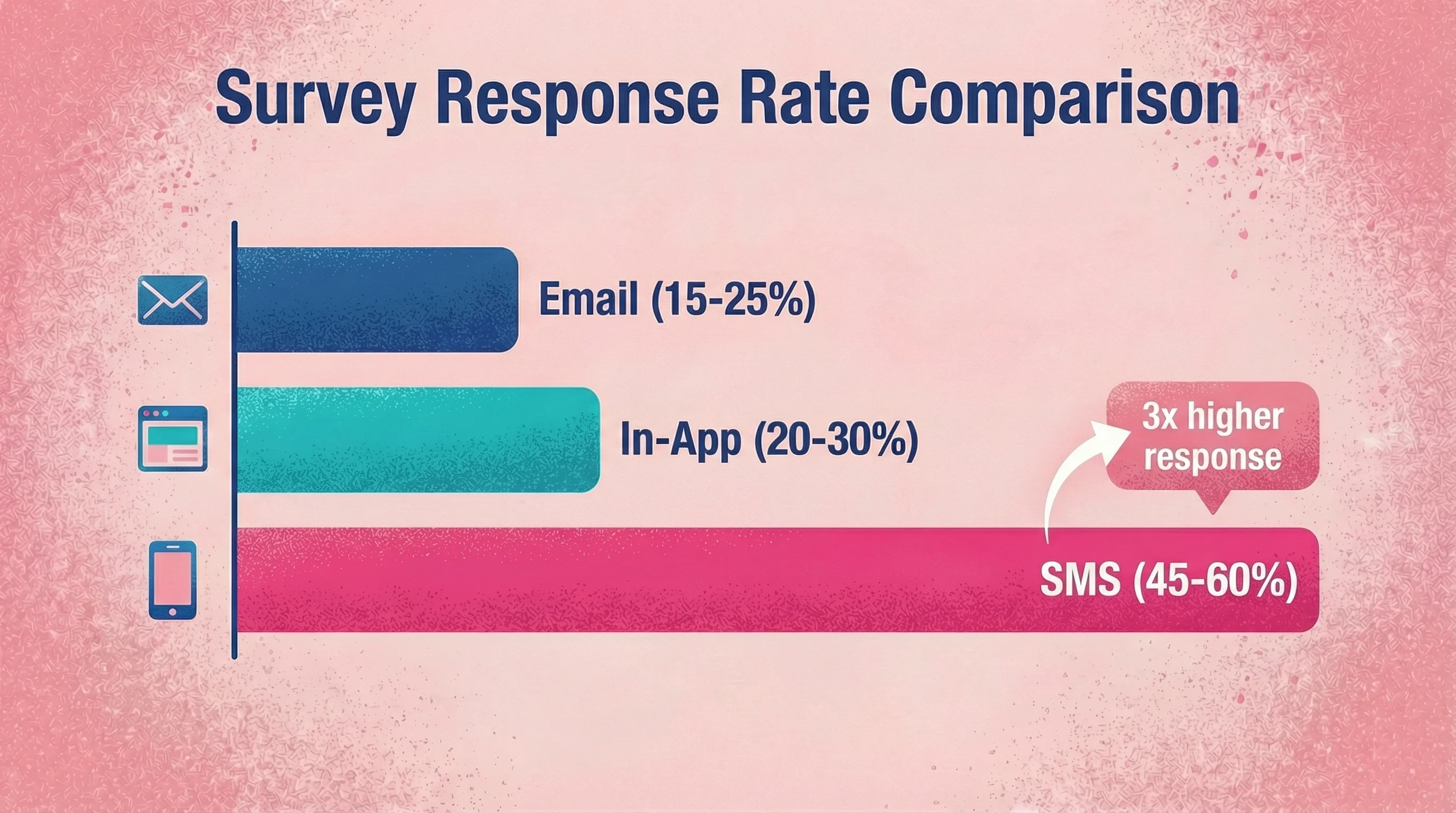
Survey fatigue is real. Email surveys see response rates of just 15-25%, with some studies reporting averages as low as 12%. But the bigger issue isn't response rates—it's response quality.
Common feedback you get:
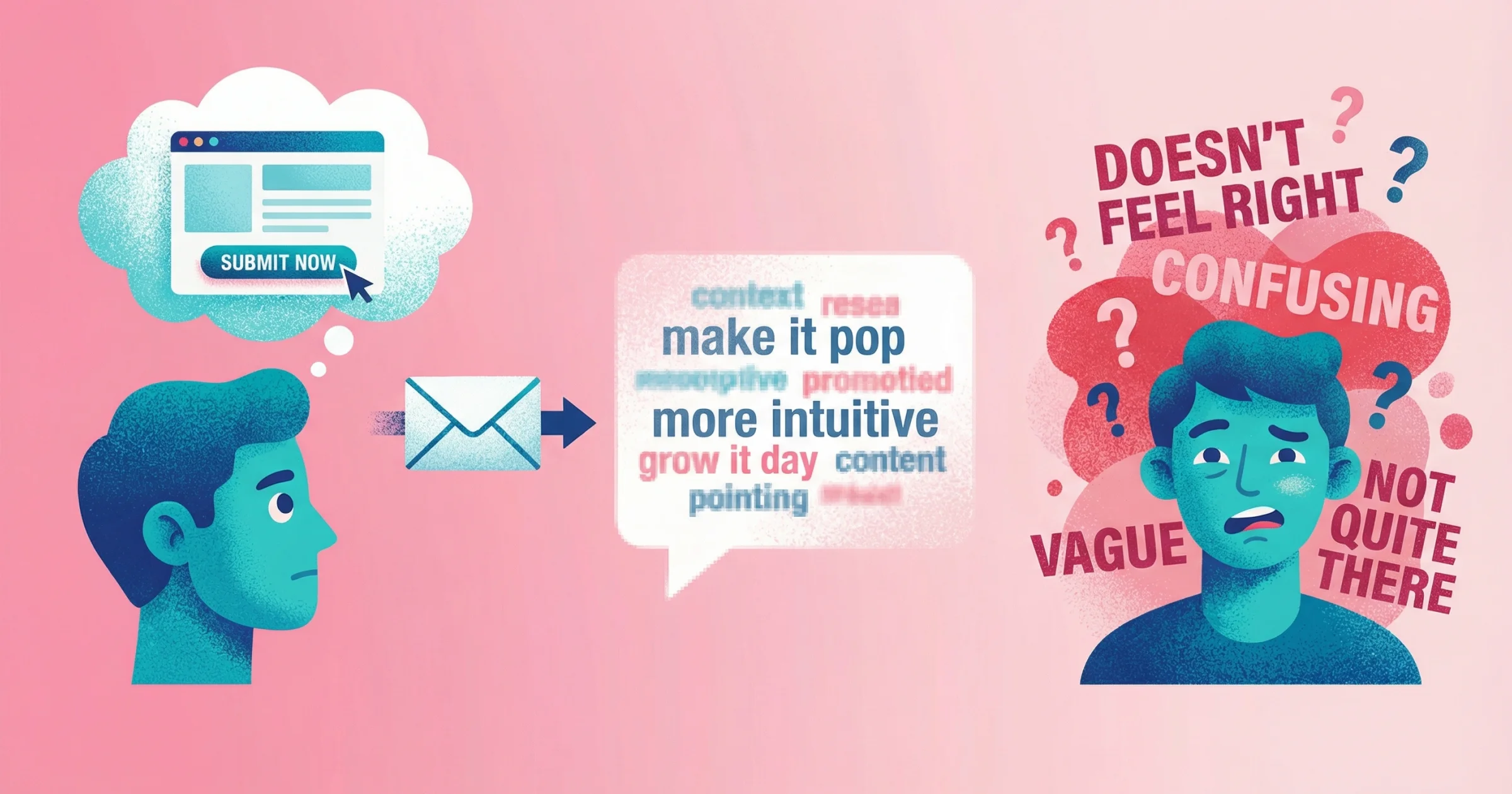
"The interface is confusing" (What specifically? Where?)
"Make it more intuitive" (Intuitive how?)
"I don't like the layout" (Which part? Why?)
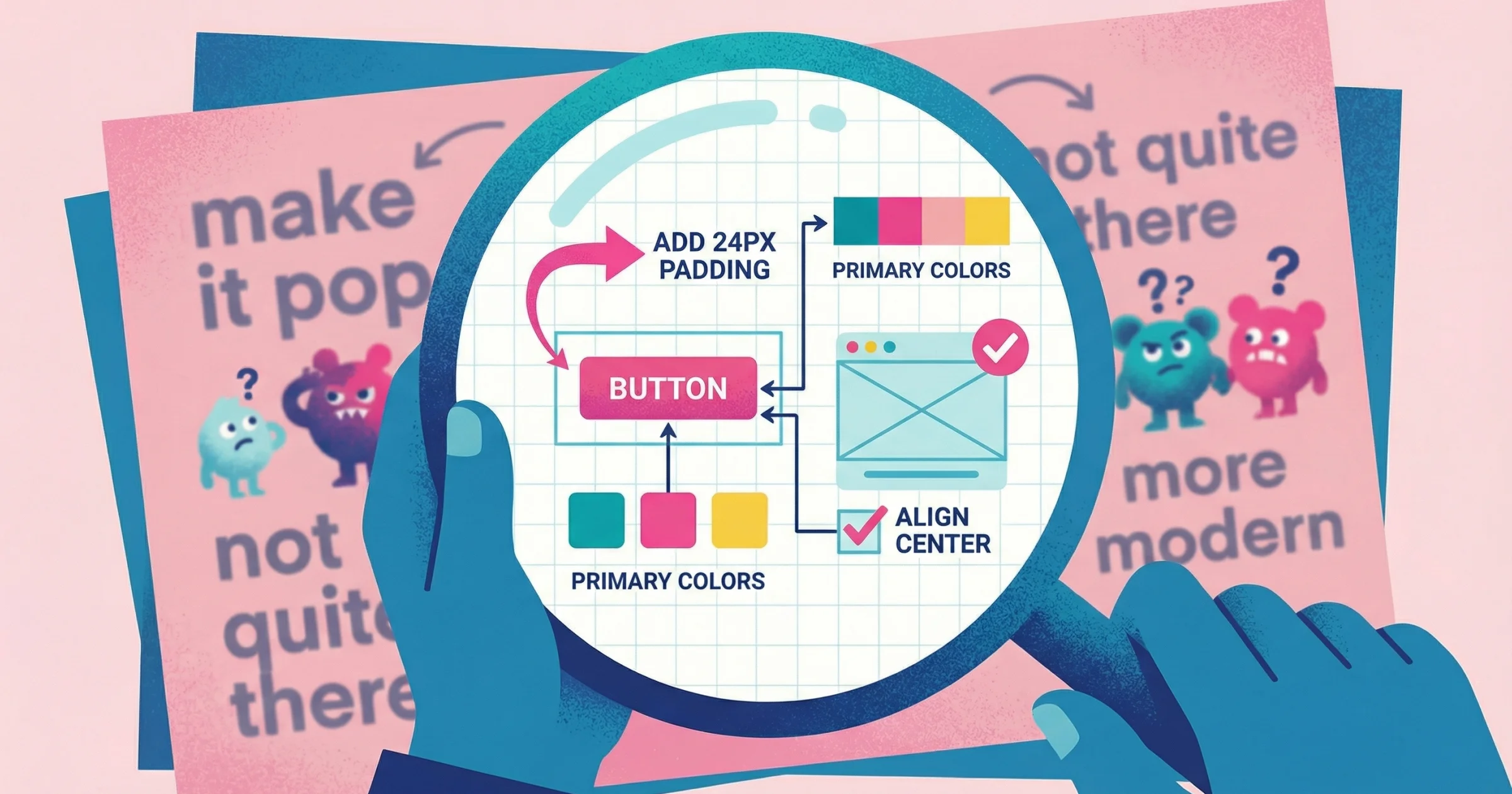
I've experienced this from both sides. During my years at PepsiCo, I watched internal teams give external agencies feedback like "it just doesn't feel right" or "we need more of this"—and the agency would go back and spin their wheels trying to decode what that actually meant. As an independent designer for the past 15+ years, I've been on the receiving end too. Clients tell me to "make things more intuitive" or "improve the user experience" without being able to point to what's actually broken.
These aren't lazy clients. They're often under time pressure in a meeting, feeling the social dynamics of a call, and forced to articulate something visual in the moment. That's hard for anyone.
I recently worked with a client who asked me to "bring a slide to life—make it more illustrative." I added illustrations. They said it wasn't illustrative enough. I added more. Still not enough. Three rounds of revisions later, we finally landed on what they'd pictured from the start. If they could have just shown me an example or pointed at what they meant, we'd have saved a week. This is the core problem with design feedback—written comments fail because they ask people to describe visual problems in words.
The solution isn't better survey questions. It's giving customers easier ways to show you what they mean.
10 Low-Friction Methods to Collect Customer Feedback
1. Async Video Feedback (Let Them Record Their Screen)
Instead of asking customers to describe problems, give them a link where they can record their screen while talking through their experience. They click around, point out issues, and you see exactly what they mean.
Why it works: Research shows video responses are substantially more detailed than written ones—averaging 45 words across 3.2 sentences for video versus just 25 words and 1.7 sentences for text. Video responses also exhibit "richer themes and greater multi-dimensionality," capturing tone, emotion, and context that text misses.
This is exactly why I built Talki. Earlier this year, I had a client who would send feedback via email, and inevitably that email would turn into a video call—a live working session where they'd share their screen and show me exactly what they meant. After a few of these, I thought: why couldn't they just record that on their own? They were already demonstrating what they wanted on the call. If they could capture that same screen share asynchronously, we'd skip the scheduling, skip the repeat explanations, and I'd get feedback I could actually act on.
How it works:
Send a feedback request link
Customer clicks, records their screen and voice
You get a video showing the exact problem, hesitation, or confusion
Best for:
UX feedback and usability testing
Bug reports from non-technical users
Design feedback from clients or stakeholders
Customer support escalations ("show me what you're seeing")
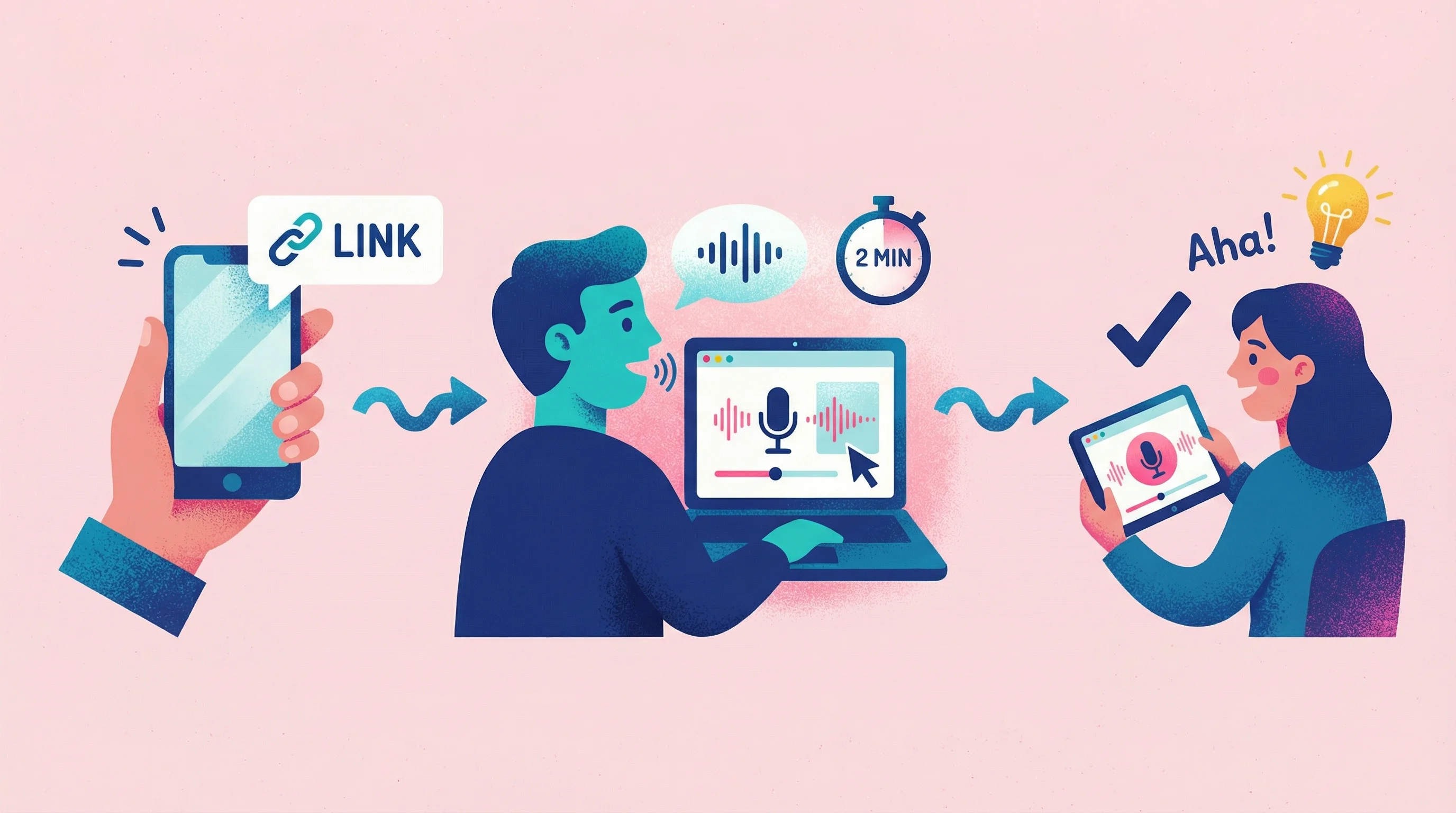
The adoption reality: About two-thirds of users will opt for text over video when given the choice—primarily due to discomfort being on camera (51%) or not feeling camera-ready (48%). But those who do record provide dramatically richer feedback, and removing friction (no accounts, no downloads) significantly improves uptake.
Tools: Talki (no signup required for respondents), UserTesting, Lookback. For a detailed comparison of options, see our video feedback tools comparison.
Friction level: Low—if the tool doesn't require the customer to create an account or install software. High if it does.
The key insight: when someone can point at their screen and say "this thing right here," you eliminate 90% of the clarification back-and-forth. Companies report video-based support resolves tickets 46% faster on average.
2. In-App Feedback Widgets
Meet customers where they already are. An in-app widget lets users report issues or share thoughts without leaving your product. The best widgets capture context automatically—what page they're on, what they clicked, their session info.
Why it works: In-app surveys achieve 20-30% response rates, with well-implemented ones exceeding 30%—double or triple email performance. One study of 500 in-app micro-surveys saw an average 25% response rate. Placement matters: a centered modal can reach nearly 40% response, while a subtle corner widget draws far less engagement.
How it works:
User clicks a feedback button inside your app
They type a message, optionally screenshot or screen record
You get the feedback with session context attached
Best for:
Bug reports with automatic context
Feature requests from active users
Frustration moments captured in real-time
Tools: Hotjar, Userpilot, Intercom, Marker.io. If you're specifically collecting feedback on designs, see our guide to the best design feedback tools.
Friction level: Very low—users don't leave the app. But passive widgets (always-present "Feedback" tabs) only get clicked by 3-5% of users.
The trade-off: In-app surveys get many quick responses but fewer lengthy comments. Email surveys have lower response rates but higher rates of qualitative feedback from those who do respond.
3. Session Recordings (Passive Feedback)
Sometimes the best feedback is watching what customers actually do instead of what they say they do. Session recordings capture user behavior automatically—mouse movements, clicks, scrolls, hesitations.
Why it works: Users often don't report problems—91% of unsatisfied customers don't bother to complain, they simply leave. Session recordings catch what they don't tell you.
Key signals to watch:
Rage clicks: Rapid clicking on the same element signals frustration. Research by FullStory across 100 large retail sites found consumers averaged 1.2 rage clicks per shopping session—up 21% year-over-year. Each rage click means "your site or app didn't react the way your customer wanted or thought it should."
Dead clicks: Clicking elements that don't respond indicates misleading design or broken functionality.
Mouse hesitation: Wandering cursor movements and long hovers often indicate confusion.
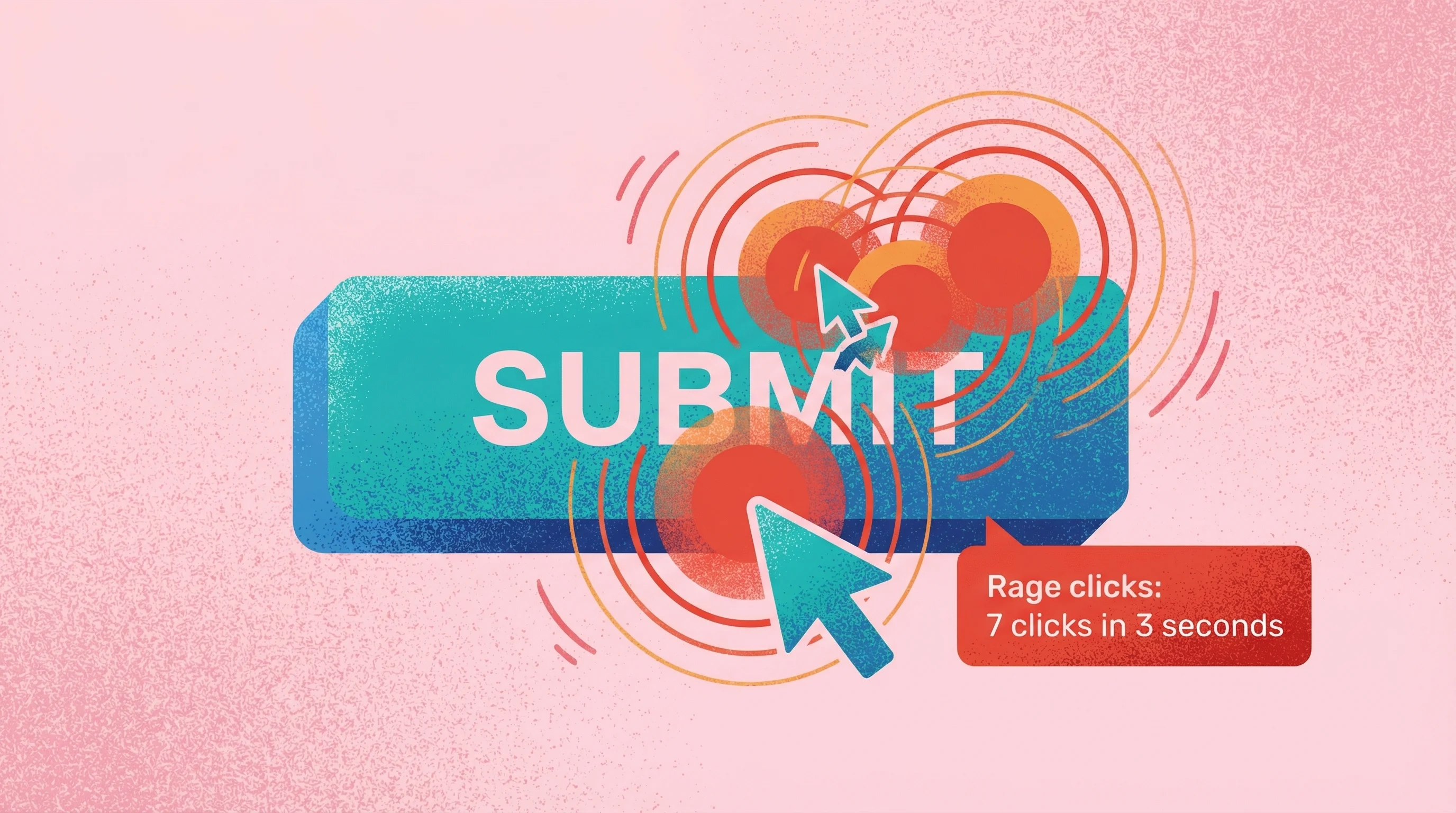
How it works:
Install a tracking snippet on your site/app
Recordings are captured automatically for all (or sampled) users
Filter sessions by frustration signals (rage clicks, errors) to find the most instructive ones
Best for:
Identifying UX problems users don't report
Understanding checkout or onboarding drop-off
Validating whether users actually use a feature
Tools: Hotjar, FullStory, Mouseflow, Microsoft Clarity (free)
Friction level: Zero for users—it's passive. It's unobtrusive, unbiased observation of real behavior at scale.
Limitation: You see what they did, not why. Pair with another method to understand intent.
4. Customer Interviews (But Async)
Traditional interviews are valuable but scheduling is a nightmare. Both parties need to find time, show up, and be "on." Async interviews let customers respond on their own schedule—and research shows they often produce more thoughtful, less biased answers.
Why it works: When participants can take time to formulate answers, they provide more reflective and detailed insights. Without an interviewer present, social desirability bias decreases—people give more genuine answers without the subtle pressure to please. Research firm Sago found async methods lead to "more honest feedback due to reduced social pressure."
How it works:
Send a set of questions via video or text
Customers record responses when convenient
You review and follow up as needed
Best for:
Deep qualitative feedback without scheduling
Customers in different time zones
Sensitive topics where people prefer thinking before responding
Reaching customers who can't commit to a live call
Tools: Talki, VideoAsk, Zigpoll, Typeform (video responses)
Friction level: Medium—still requires effort from customers, but no scheduling coordination.
5. Community and Forum Feedback
If you have an active user community, it's already generating feedback—you just need to capture it systematically. Community feedback is public, which means customers elaborate for each other, build on ideas, and self-organize around common issues.
The bias you must know: The 90-9-1 rule applies to most online communities—90% of users lurk silently, 9% contribute occasionally, and 1% generate most of the content. This means forum feedback is dominated by a vocal minority. Those power users might be enthusiasts, or they might be particularly unhappy customers—either way, their views can skew perceived consensus.
I saw this play out during my time on the product team at Vice. Leadership would demand features based on their own hunches about what users wanted. Those features got built—and then quietly died a year later because the actual users never needed them. The loudest voices in the room weren't the people using the product. When you don't give real users a way to voice their opinions, you end up building for an agenda, not an audience.
How it works:
Create spaces for feature requests, bug reports, and discussions
Let users vote and comment on each other's ideas
Monitor for themes and prioritize based on engagement—but verify with other methods
Best for:
Feature prioritization with actual demand signals
Building customer loyalty through involvement
Identifying power users and advocates
Tools: Discourse, Circle, Canny, ProductBoard, native Slack/Discord
Friction level: Low for engaged users. But you're sampling from your most active customers, not the silent majority. Always complement with outreach to less vocal customers.
6. Micro-Surveys (One Question, Right Time)
The opposite of a 20-question quarterly survey. Micro-surveys ask one question at a contextually relevant moment. "Was this article helpful?" after reading support docs. "How easy was that?" after completing a task.
Why it works: Timing and context matter more than channel. Reaching customers immediately after a key interaction dramatically improves both response rates and feedback relevance.
The key metrics (benchmarks via Userpilot):
CSAT (Customer Satisfaction): Average scores run 65-80% across industries; above 80% is excellent, below 60% signals problems. SaaS averages around 68%.
NPS (Net Promoter Score): Average is around 32 overall, 36-40 for SaaS. Above 50 is excellent; negative means more detractors than promoters.
CES (Customer Effort Score): Average is around 72% "easy" responses. Below 70% means too much friction; above 90% is outstanding.
How it works:
Trigger a single question based on user action
Capture the response with minimal interruption
Aggregate over time for quantitative insights
Best for:
Task-specific feedback (CES after support, CSAT after purchase)
Measuring specific feature satisfaction
Benchmarking over time with consistent metrics
Tools: Delighted, Refiner, Wootric, custom implementation
Friction level: Very low—one click. But you're limited to simple quantitative signals. Always include an optional "Why?" follow-up.
7. Support Conversation Mining
Your support tickets already contain feedback—customers telling you exactly what's broken, confusing, or missing. Mining these conversations systematically turns reactive support into proactive product intelligence.
Why it works: Customers contacting support are already motivated to explain their problems in detail. You're not asking for extra effort—you're extracting value from conversations already happening.
AI acceleration: Modern AI can automatically transcribe, summarize, and categorize support conversations. Research cited by Zoom shows AI-based transcripts and summaries can save agents 35% of their call handling time—but more importantly for feedback, AI can scan thousands of conversations to surface recurring themes, sentiment trends, and emerging issues that individual agents might miss.
How it works:
Tag and categorize support conversations (manually or via AI)
Identify recurring themes and pain points
Quantify feedback by issue type and severity
Best for:
Identifying bugs and issues at scale
Understanding the real problems customers face
Prioritizing based on support volume
Tools: Intercom, Zendesk (with reporting), Plain, AI summarization tools
Friction level: Zero for customers—they're already contacting support. High for you without good tooling.
8. Social Media Listening
Social media is where customers often share candid, unfiltered opinions without being asked. Tapping into these "uninfluenced thoughts and opinions" provides more authentic insights than formal surveys. It helps brands gauge real-time sentiment and catch emerging issues or trends.
Why it works: 51% of marketers use social listening to better understand customer needs, underscoring its value in gathering honest feedback. Unlike surveys where customers know they're being asked for input, social media captures what people say when they think you're not listening—often the most truthful feedback you'll get.
How it works:
Set up monitoring: Use a social listening tool to track brand mentions, relevant keywords, hashtags, and even competitor names across platforms
Collect and analyze: Aggregate posts, comments, and reviews into one feed. Analyze sentiment and recurring themes (for example, note if multiple tweets mention a specific product issue or feature request)
Engage and log insights: Respond when appropriate—a quick reply to a complaint can turn around a negative experience. Internally, log feedback trends and discuss improvements based on what you "overhear" online
Best for:
Brand sentiment and reputation tracking—understand how customers feel about your product or service in the wild, and address issues before they escalate
Uncovering pain points customers don't report directly—catch complaints or suggestions voiced on Twitter, Reddit, etc., that never hit your support inbox
Competitive insights—monitor what people praise or criticize about your competitors to inform your own product development and messaging
Tools: Sprout Social, Brandwatch, Hootsuite (Insights), Mention, Talkwalker
Friction level: Low—it's passive from the customer's perspective. They vent or praise on their own terms; you're just quietly collecting it. No extra effort is required from the user to give feedback (though internally you'll invest time filtering noise).
Limitation: Social listening is hit-or-miss—there are no guarantees you'll find the feedback you need, and the data can be unstructured and unpredictable. Not every customer voices their thoughts publicly, so you may hear mostly the loudest (or most extreme) opinions.
9. Post-Purchase Email Sequences
Right after a customer interaction, their engagement is at its peak—a perfect time to collect customer feedback. Surveys sent immediately post-purchase or post-service often see high response rates, with some brands reporting 50%+ response rates.
Why it works: Customers are more likely to give thoughtful input when the experience is fresh, and asking them shows you care. In fact, soliciting feedback makes customers feel heard and valued, which can boost loyalty and retention.
How it works:
Trigger at the right moment: Automate emails based on specific events—a purchase confirmation (with a subtle "How was your shopping experience?" question), onboarding completion, or support ticket closure. Timing is crucial: send the feedback request soon after the event, but not before the customer has had a chance to use the product or service (for example, trigger a product review email only after the item is delivered and used)
Keep it short and relevant: Ask a concise question or two. For example, a star rating and an optional comment, or an NPS question ("How likely to recommend us?"). Make it easy—one-click responses or a quick link to a short survey works best. Optionally, offer an incentive like a discount on next purchase for completing the survey
Follow up and act: If the customer provides negative feedback or indicates dissatisfaction, have a follow-up plan. For instance, route low ratings to a customer success rep who can reach out to remedy the situation. Internally, aggregate the responses (average CSAT after support calls, common suggestions after onboarding) and close the loop by improving your process or product
Best for:
Post-purchase satisfaction—gauge customer happiness with the product and buying experience. Great for ecommerce or product sales (ask about the checkout, delivery, product expectations)
Onboarding feedback—after a user has gone through onboarding or a training period, learn how that went. You might ask "How was your onboarding experience? Anything we could do better to get you up to speed?"
Service or support follow-up—after resolving a support ticket or consulting engagement, ask the customer to rate the experience. This helps identify if their issue was truly resolved and how they felt about the service quality
Tools: Intercom (for automated onboarding emails), Zendesk or Freshdesk (for support follow-up surveys), HubSpot or Mailchimp (for email automation), Delighted or Qualtrics (for embedding quick feedback surveys in emails)
Friction level: Medium—it's an extra step for the customer, who must read the email and click a link or respond. The key is keeping the survey ultra-short; a one-minute feedback request right after an experience feels reasonable, but a long form will be skipped. Because these emails come triggered by the customer's own action (purchase or support), they feel natural—yet there's still a drop-off if the survey is too long or the email timing is off.
Limitation: Response rates can still be a challenge—many people ignore emails. There's also a bias factor: customers who feel strongly (very happy or unhappy) are more likely to respond, while the quietly neutral majority may not. Additionally, timing must be handled carefully; if you ask for feedback too soon (before the customer has used the product), you'll get skewed data or annoy the customer.
10. Focus Groups (Virtual/Async)
Focus groups leverage group dynamics to surface insights you might miss in one-on-one chats. When a handful of customers discuss a topic together, they build on each other's ideas, sparking creative thoughts and revealing consensus or disagreements in real time.
Why it works: Modern virtual focus groups can be done via video conference or even asynchronously (through online forums or communities), allowing you to tap a geographically diverse pool without the logistical hurdles. Online formats can sometimes encourage more honesty too—participants may feel more comfortable speaking freely from home, or even anonymously in text-based discussions, leading to more candid feedback.
How it works:
Recruit 5–10 participants who represent your target customer segments (for example, a mix of power-users and casual users, or customers from several key industries you serve). Offer an incentive for their time, since a focus group typically asks for 30-60 minutes of commitment
Choose your format: For a live virtual focus group, schedule a Zoom or Teams meeting at a convenient time and have a moderator (maybe you or a UX researcher) lead the conversation. For an async approach, use an online discussion board or a Slack/Discord channel, and post prompts/questions over a set period (say, one question per day for a week), allowing participants to answer on their own schedule
Moderate and probe: Prepare open-ended questions to guide the session. Start broad ("How do you currently handle X?") and then drill down into reactions ("What do you think of this new concept we're showing?"). Encourage all voices to be heard—in a live session, that might mean politely inviting a quiet participant to share their view. In an async discussion, it means the moderator responds to or highlights quieter participants' posts to draw them out. The moderator should also clarify responses as needed ("Can you elaborate on why you feel that way?") and ensure the group stays on topic
Analyze collaboratively: Record the session (with permission) or save the discussion transcripts. Afterward, review the conversation for common themes, surprising ideas, or direct quotes that capture a point vividly. Because focus groups are qualitative, look for why customers feel as they do. Share the findings with your team (perhaps clipping key video moments or quoting participants) and decide on actions (tweaking a feature, altering messaging) based on these rich insights
Best for:
Exploring "why" behind feedback—when you have survey data or analytics showing a problem (low usage of a feature), a focus group can discuss why that might be, in customers' own words
Concept and UX testing—before you invest in building something new, get a group's reaction to a prototype or idea. The group setting can generate a back-and-forth ("I actually would use it if it did Y..." "Oh, good point, I hadn't thought of that") that refines raw ideas
Diverse perspective brainstorming—if you want a range of opinions, assembling different customer types in one (virtual) room lets you quickly hear multiple viewpoints. This is especially useful for idea generation through group synergy
Tools: Zoom or Microsoft Teams (for live video discussions), Remesh (specialized platform for large-scale online focus groups and AI analysis), Recollective or FocusGroupIt (for asynchronous discussion boards), UserTesting or UserZoom (for remote moderated sessions), community platforms like Facebook Groups or Discord (for informal async focus group-style discussions)
Friction level: High—this method asks a lot from participants. Joining a 60-minute discussion or repeatedly checking into an online forum requires commitment. You'll usually need to incentivize participants (gift cards, discounts, or stipends are common) to compensate for their time. From the customer's perspective, it's a bigger ask than a quick survey, so expect to recruit more people than you need, as some will drop off. The upside is the depth of insight makes the effort worthwhile if you manage to get the right people in the (virtual) room.
Limitation: Focus groups can be prone to group bias. There's a risk of groupthink—where outspoken participants sway others, or quieter folks hold back their true feelings. Also, the feedback, while rich, comes from a small sample; it might not be fully representative of your whole customer base. You have to be careful not to overgeneralize findings (and ensure a strong moderator can handle dominant personalities to get balanced input).

How to Choose the Right Method
What You Need | Best Method |
|---|---|
Visual feedback on designs or UI | Async video feedback |
Bug reports with context | In-app widget or video recording |
Understanding user behavior | Session recordings |
Deep qualitative insights | Async interviews or focus groups |
Feature prioritization | Community voting + support mining |
Quick satisfaction metrics | Micro-surveys or post-purchase emails |
Feedback from non-technical users | Video feedback (show don't tell) |
Real-time sentiment tracking | Social media listening |
Post-interaction feedback | Post-purchase email sequences |
The Friction Rule
Research on form abandonment is stark: 81% of users have abandoned an online form after starting it. Every step you add loses respondents:
Require account creation → 24%+ immediate drop-off (Baymard Institute found this was the second most-cited reason for checkout abandonment)
Require software installation → 70%+ drop-off
Require scheduling a call → 80%+ drop-off
Ask for more than 3 sentences → significant quality decline
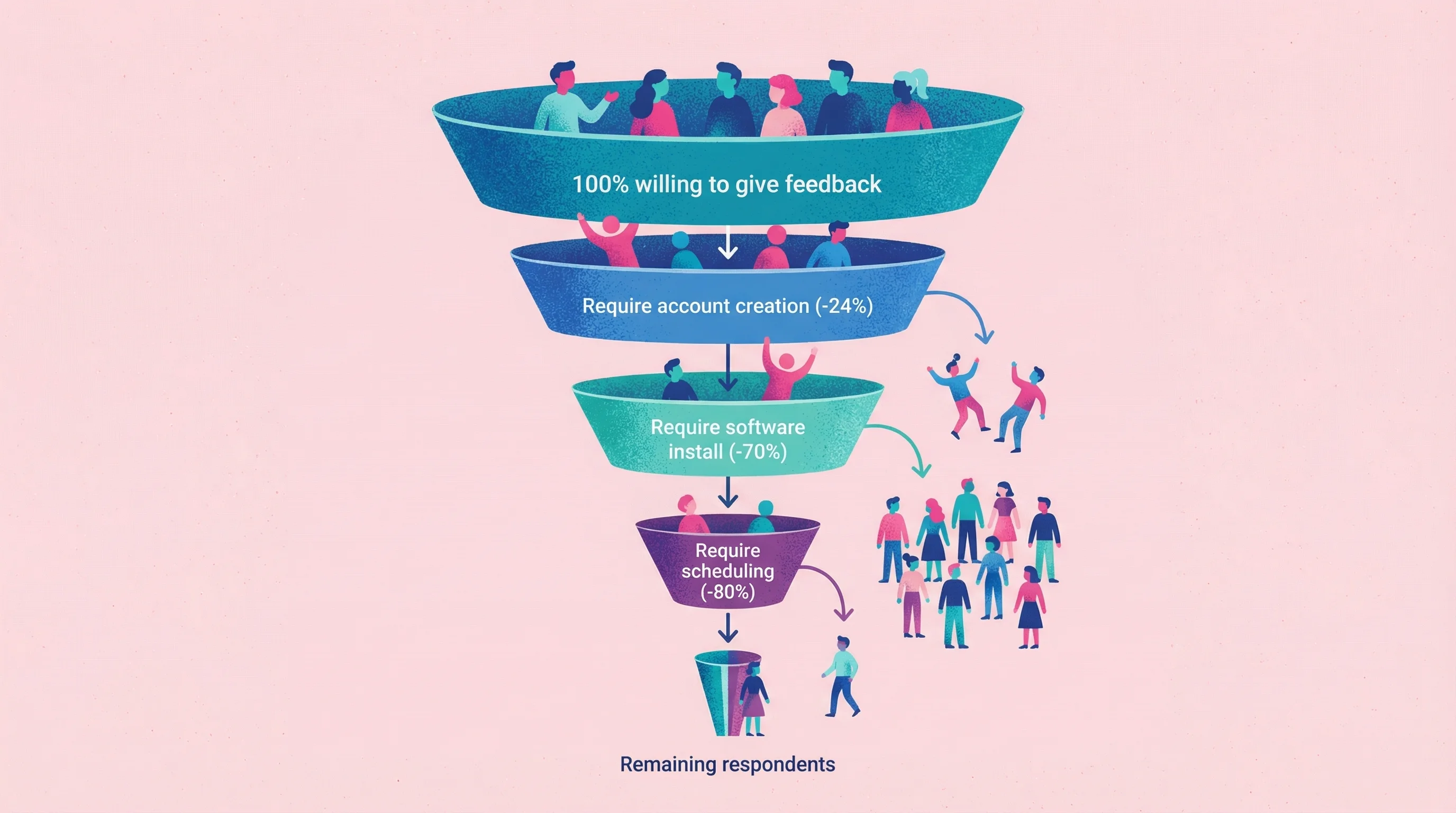
The best feedback method is the one your customers will actually use. For most scenarios, that means:
No account required
Under 2 minutes to complete
Available when they have the feedback (not days later via email)
Customer Feedback Collection Best Practices
Once you've chosen your methods, how you implement them matters as much as which tools you pick. These seven practices separate effective feedback programs from those that waste everyone's time.
1. Time Your Feedback Requests Right
Ask immediately (or very soon) after the customer experience. The moment a service is delivered or a user completes a transaction is the "golden window" for feedback. At that point, details are fresh in their mind—you'll get more accurate and higher response rates.
One study found you shouldn't wait days to ask for input: surveying customers right after an interaction yields more helpful data, and can even prevent churn by catching issues early. An estimated 67% of customer churn is preventable if you resolve an issue at the time it occurs. If you delay too long, memories fade and feelings cool—or the customer may have already decided to leave silently.
The best practice is to embed feedback prompts into the user journey at natural touchpoints (end of a chat, post-purchase page, etc.) when engagement is highest.
2. Keep Surveys Short and Simple
Respect your customers' time—shorter is better. Every additional question you ask or minute a survey takes, the more drop-offs you'll see. Research shows that surveys with more than 12 questions or over 5 minutes long see significant response rate decline (as much as a 15% drop in responses).
It makes sense: even loyal customers will click away if a feedback form feels like a chore. To improve completion, focus on the essential questions that will yield actionable info. Often, a few well-chosen questions (or even a single-question micro-survey) can get you 90% of the insight you need.
Pro tip: let people know up front "This will only take 1 minute"—setting that expectation can boost completion. And always avoid unnecessary complexity or jargon in questions (clear and easy wins the day).
3. Close the Feedback Loop
Don't collect customer feedback and ignore it—follow up and let the customer know you heard them. If a customer gives you feedback (especially negative feedback), responding personally can turn the situation around.
For example, if a user gives a low NPS score and leaves a scathing comment, a quick reply or call from your team apologizing and addressing their concerns can save that relationship. Companies that "close the loop" quickly—within 48 hours—see measurable benefits (one study noted a 6-point increase in NPS when follow-ups were this prompt).
Even at scale, try to send follow-up emails: "Thank you for your feedback—here's what we're doing about it." Closing the loop shows each customer that their input didn't vanish into a black hole. It also yields better insight for you, as those follow-up conversations often uncover deeper context. Ultimately, feedback is only valuable if you act on it—by fixing problems and acknowledging customers, you'll reduce churn and build trust.
4. Use Multiple Channels to Collect Customer Feedback
Meet customers where they are—and that's everywhere. Don't rely on just one feedback channel like email surveys, or you'll get a skewed picture. Your customers are a diverse bunch: some tweet about their experiences, others only reply to text messages, some will never tell you directly but will rant on a review site.
The voice of the customer is spread across many places in today's digital world. To capture it, cast a wide net. Implement an in-app survey for those who live in your product, an email follow-up for those who prefer email, social listening for the outspoken social media users, and perhaps a feedback form on your website for drive-by comments.
By gathering feedback from multiple channels, you ensure you're hearing from different segments and personality types—giving you a more complete 360° view. One practical tip: centralize this multichannel feedback in one dashboard or system if possible (so you can correlate, say, what people post on Twitter vs. what they say in support tickets).
5. Segment and Personalize Feedback Analysis
All feedback isn't created equal—context is key. A request or complaint from a long-time power user might merit a different response than the same note from a brand-new customer. To make sense of feedback, always consider who it's coming from.
In other words, segment your feedback by customer type, demographic, lifecycle stage, or behavior. Product managers often say the first step is knowing which segment a piece of feedback represents, because that frames the user's motivation and needs.
For example, if several free-tier users suggest a new feature, weigh that alongside what your enterprise paying customers are saying—the priorities may differ. Segmenting can be as simple as tagging feedback with attributes (customer tier, use case, region) when it comes in. Then you can identify patterns: "Upsell suggestions mostly come from our enterprise customers," or "New users keep mentioning the setup process."
This prevents one loud outlier from swaying your decisions and helps you prioritize improvements that matter most to each segment. In short, always filter feedback through the lens of whose voice it is.
6. Act on Feedback and Show It
Make visible improvements based on what customers say, and let them know they had an impact. Customers will voice feedback more freely when they believe it leads to real change. There's no better way to build trust than to demonstrate that you're listening.
For instance, if multiple users complain about a missing feature, and you decide to build it, close the loop publicly: highlight that update in your release notes or newsletter and mention it came from customer suggestions. (For example: "You asked for Dark Mode, and we're excited to roll it out this update!")
This kind of transparency shows customers their input is valued. Some companies even credit users by name or "shout out" a customer idea in a blog post. When people see their feedback actually shaping the product or service, it sends a clear message: Your voice matters.
This not only delights the customers who gave the input, but also encourages others to speak up, knowing the company acts on feedback. The outcome is a positive feedback loop (pun intended)—more engagement, more loyalty, and a better product or service thanks to customer-driven improvements.
7. Avoid Leading or Biased Questions
Ask questions the right way to get honest answers. How you ask for feedback greatly affects the feedback you get. If your survey questions or interview phrasing is loaded with bias, you'll just hear your own thoughts echoed back.
Leading questions (like "Don't you think our new interface is great?") will almost always result in skewed, unreliable answers. Respondents tend to mimic the language or implied sentiment of the question, yielding misleading data. For example, asking "How awesome was our support team?" primes people to say it was awesome—even if it wasn't.
To get truth, use neutral wording and open-ended questions. Instead of "Was our interface confusing to you?" (leading), ask "How was your experience with the interface?" and let them describe it in their own terms. Training your team on neutral survey design and interview technique is crucial.
The goal is to make the customer feel safe to share any opinion, positive or negative, without feeling steered. By eliminating leading questions, you'll gather feedback that's far more credible and actionable, rather than false positives that send you down the wrong path. Remember, you want the customer's genuine perspective—not validation of your own.
A Note on Privacy and Compliance
If you're collecting video feedback or using session recordings, handle the data carefully—especially with users in the EU or California.
For video feedback tools:
Get explicit consent before recording (explain what will be captured and why)
Disclose the tool in your privacy policy
Allow users to opt out or request deletion
For session recordings:
Configure tools to mask sensitive fields (passwords, payment info, personal data)
Include session recording in your cookie consent/privacy policy
Use tools that offer GDPR-compliant data handling (Hotjar, for example, stores EU data in the EU and offers automatic suppression of sensitive content)
Treating user recordings as personal data (because they are) builds trust and keeps your feedback collection legal and user-friendly.

Combining Methods for a Complete Picture
No single method captures everything. A complete customer feedback system usually includes:
Quantitative baseline: Micro-surveys (CSAT, NPS, CES) to track trends over time
Qualitative depth: Video feedback or async interviews for understanding the "why"
Passive observation: Session recordings to catch what customers don't report
Ongoing signal: Support conversation mining for continuous intelligence
Start with one method that solves your most urgent feedback gap. Add others as you scale. For help choosing specific tools, see our feedback collection tools comparison.
FAQ
How do I collect customer feedback without being annoying?
Timing beats frequency. Ask immediately after the experience you're measuring (not days later), keep it to one question when possible, and make it easy to respond without creating accounts or scheduling calls. In-app prompts at the right moment dramatically outperform email follow-ups.
What's the best way to collect feedback from non-technical users?
Video feedback works best for gathering user feedback from non-technical people. This is especially true for design feedback, where clients often know what they want but can't articulate it in writing. Instead of asking them to describe the problem, give them a link to record their screen. They can point and say "this thing here isn't working" without needing technical vocabulary.
How can I improve survey response rates?
Switch channels and reduce friction. Email surveys average 15-25% response; in-app surveys hit 20-30%; SMS can reach 45-60%. Remove account requirements (24% abandon when forced to sign up). Ask one question instead of twenty. Time surveys to appear immediately after relevant actions, not days later.
Can I collect video feedback without making customers install software?
Yes. Tools like Talki let you send a link where customers can record their screen directly in the browser—no account creation, no downloads, no app installation. The lower the friction, the higher your response rate.
What's the best client feedback form template?
For high response rates, simpler is better. A single rating question (CSAT, NPS, or CES) with an optional "Why?" follow-up captures actionable data without overwhelming respondents. If you need richer feedback, use video recording instead of longer written forms—you'll get more detail with less user effort.
How do I organize and act on feedback once I have it?
Tag by theme, not by source. Group feedback into categories (usability, bugs, features, pricing) regardless of whether it came from surveys, support, or video. Then prioritize based on frequency, severity, and alignment with your roadmap.
Which client feedback software should I use?
It depends on your primary need:
Video feedback: Talki, VideoAsk, UserTesting
In-app widgets: Hotjar, Userpilot, Marker.io
Session recordings: FullStory, Hotjar, Microsoft Clarity (free)
Micro-surveys: Delighted, Refiner, Wootric
Support mining: Intercom, Zendesk, Plain
Start with one tool that addresses your biggest feedback gap, then expand.

Stop Asking, Start Showing
The gap between what customers experience and what they can articulate is where feedback dies. Written surveys widen that gap. Video and visual feedback methods close it.
The next time you need feedback, don't ask "what do you think?" Give them a way to show you.