"/><stop offset="1" stop-color="rgb(255, 100, 165)"/></linearGradient></defs><g d="M 0 0 L 60 0 L 60 60 L 0 60 Z M 9 60 C 4.029 60 0 55.971 0 51 L 0 9 C 0 4.029 4.029 0 9 0 L 51 0 C 55.971 0 60 4.029 60 9 L 60 51 C 60 55.971 55.971 60 51 60 Z M 42.974 11.215 C 43.145 11.215 43.331 11.198 43.535 11.164 C 43.773 11.096 44.011 10.942 44.249 10.704 C 44.385 10.568 44.538 10.5 44.708 10.5 C 44.98 10.5 45.184 10.653 45.319 10.959 L 49.347 18.412 C 49.449 18.616 49.5 18.77 49.5 18.872 C 49.5 19.144 49.364 19.348 49.092 19.484 L 46.951 20.658 C 46.747 20.76 46.577 20.811 46.441 20.811 C 46.237 20.811 46.05 20.658 45.88 20.352 L 45.727 20.046 C 44.878 18.344 43.654 17.136 42.057 16.422 C 40.46 15.707 38.624 15.349 36.551 15.349 L 34.053 15.349 L 34.053 41.588 C 34.053 42.949 34.308 44.106 34.818 45.059 C 35.327 45.978 36.228 46.437 37.519 46.437 L 37.876 46.437 C 38.386 46.437 38.641 46.692 38.641 47.203 L 38.641 48.734 C 38.641 49.245 38.386 49.5 37.876 49.5 L 22.174 49.5 C 21.664 49.5 21.41 49.245 21.41 48.734 L 21.41 47.203 C 21.41 46.692 21.665 46.437 22.175 46.437 L 22.481 46.437 C 23.772 46.437 24.673 45.978 25.182 45.059 C 25.692 44.106 25.947 42.949 25.947 41.588 L 25.947 15.349 L 23.449 15.349 C 21.376 15.349 19.541 15.707 17.943 16.421 C 16.346 17.136 15.122 18.344 14.273 20.046 L 14.12 20.352 C 13.95 20.658 13.763 20.812 13.559 20.812 C 13.423 20.812 13.253 20.761 13.049 20.659 L 10.908 19.484 C 10.636 19.348 10.5 19.144 10.5 18.872 C 10.5 18.77 10.551 18.616 10.653 18.412 L 14.68 10.959 C 14.85 10.653 15.054 10.5 15.292 10.5 C 15.462 10.5 15.615 10.568 15.751 10.704 C 15.989 10.943 16.21 11.096 16.414 11.164 C 16.651 11.197 16.855 11.215 17.026 11.215 Z" fill="transparent" height="60px" id="wnIU_RgRP" width="60px"><path d="M 0 0 L 60 0 L 60 60 L 0 60 Z" fill="transparent" height="60px" id="g9vASv_I0" width="60px"/><path d="M 9 60 C 4.029 60 0 55.971 0 51 L 0 9 C 0 4.029 4.029 0 9 0 L 51 0 C 55.971 0 60 4.029 60 9 L 60 51 C 60 55.971 55.971 60 51 60 Z" fill="rgb(254, 254, 254)" height="60px" id="Zi9UWh_Wu" width="60px"/><g d="M 32.474 0.715 C 32.645 0.715 32.831 0.698 33.035 0.664 C 33.273 0.596 33.511 0.442 33.749 0.204 C 33.885 0.068 34.038 0 34.208 0 C 34.48 0 34.684 0.153 34.819 0.459 L 38.847 7.912 C 38.949 8.116 39 8.27 39 8.372 C 39 8.644 38.864 8.848 38.592 8.984 L 36.451 10.158 C 36.247 10.26 36.077 10.311 35.941 10.311 C 35.737 10.311 35.55 10.158 35.38 9.852 L 35.227 9.546 C 34.378 7.844 33.154 6.636 31.557 5.922 C 29.96 5.207 28.124 4.849 26.051 4.849 L 23.553 4.849 L 23.553 31.088 C 23.553 32.449 23.808 33.606 24.318 34.559 C 24.827 35.478 25.728 35.937 27.019 35.937 L 27.376 35.937 C 27.886 35.937 28.141 36.192 28.141 36.703 L 28.141 38.234 C 28.141 38.745 27.886 39 27.376 39 L 11.674 39 C 11.164 39 10.91 38.745 10.91 38.234 L 10.91 36.703 C 10.91 36.192 11.165 35.937 11.675 35.937 L 11.981 35.937 C 13.272 35.937 14.173 35.478 14.682 34.559 C 15.192 33.606 15.447 32.449 15.447 31.088 L 15.447 4.849 L 12.949 4.849 C 10.876 4.849 9.041 5.207 7.443 5.921 C 5.846 6.636 4.622 7.844 3.773 9.546 L 3.62 9.852 C 3.45 10.158 3.263 10.312 3.059 10.312 C 2.923 10.312 2.753 10.261 2.549 10.159 L 0.408 8.984 C 0.136 8.848 0 8.644 0 8.372 C 0 8.27 0.051 8.116 0.153 7.912 L 4.18 0.459 C 4.35 0.153 4.554 0 4.792 0 C 4.962 0 5.115 0.068 5.251 0.204 C 5.489 0.443 5.71 0.596 5.914 0.664 C 6.151 0.697 6.355 0.715 6.526 0.715 Z" fill="transparent" height="39px" id="sJZgEX_6w" transform="translate(10.5 10.5)" width="39px"><path d="M 32.474 0.715 C 32.645 0.715 32.831 0.698 33.035 0.664 C 33.273 0.596 33.511 0.442 33.749 0.204 C 33.885 0.068 34.038 0 34.208 0 C 34.48 0 34.684 0.153 34.819 0.459 L 38.847 7.912 C 38.949 8.116 39 8.27 39 8.372 C 39 8.644 38.864 8.848 38.592 8.984 L 36.451 10.158 C 36.247 10.26 36.077 10.311 35.941 10.311 C 35.737 10.311 35.55 10.158 35.38 9.852 L 35.227 9.546 C 34.378 7.844 33.154 6.636 31.557 5.922 C 29.96 5.207 28.124 4.849 26.051 4.849 L 23.553 4.849 L 23.553 31.088 C 23.553 32.449 23.808 33.606 24.318 34.559 C 24.827 35.478 25.728 35.937 27.019 35.937 L 27.376 35.937 C 27.886 35.937 28.141 36.192 28.141 36.703 L 28.141 38.234 C 28.141 38.745 27.886 39 27.376 39 L 11.674 39 C 11.164 39 10.91 38.745 10.91 38.234 L 10.91 36.703 C 10.91 36.192 11.165 35.937 11.675 35.937 L 11.981 35.937 C 13.272 35.937 14.173 35.478 14.682 34.559 C 15.192 33.606 15.447 32.449 15.447 31.088 L 15.447 4.849 L 12.949 4.849 C 10.876 4.849 9.041 5.207 7.443 5.921 C 5.846 6.636 4.622 7.844 3.773 9.546 L 3.62 9.852 C 3.45 10.158 3.263 10.312 3.059 10.312 C 2.923 10.312 2.753 10.261 2.549 10.159 L 0.408 8.984 C 0.136 8.848 0 8.644 0 8.372 C 0 8.27 0.051 8.116 0.153 7.912 L 4.18 0.459 C 4.35 0.153 4.554 0 4.792 0 C 4.962 0 5.115 0.068 5.251 0.204 C 5.489 0.443 5.71 0.596 5.914 0.664 C 6.151 0.697 6.355 0.715 6.526 0.715 Z" fill="url(%23KbpzL6PmD-1929859876-linear-gradient)" height="38.999999999999986px" id="KbpzL6PmD" width="39px"/></g></g></svg>)
"/><stop offset="1" stop-color="rgb(255, 100, 165)"/></linearGradient></defs><g d="M 42.974 11.215 C 43.145 11.215 43.331 11.198 43.535 11.164 C 43.773 11.096 44.011 10.942 44.249 10.704 C 44.385 10.568 44.538 10.5 44.708 10.5 C 44.98 10.5 45.184 10.653 45.319 10.959 L 49.347 18.412 C 49.449 18.616 49.5 18.77 49.5 18.872 C 49.5 19.144 49.364 19.348 49.092 19.484 L 46.951 20.658 C 46.747 20.76 46.577 20.811 46.441 20.811 C 46.237 20.811 46.05 20.658 45.88 20.352 L 45.727 20.046 C 44.878 18.344 43.654 17.136 42.057 16.422 C 40.46 15.707 38.624 15.349 36.551 15.349 L 34.053 15.349 L 34.053 41.588 C 34.053 42.949 34.308 44.106 34.818 45.059 C 35.327 45.978 36.228 46.437 37.519 46.437 L 37.876 46.437 C 38.386 46.437 38.641 46.692 38.641 47.203 L 38.641 48.734 C 38.641 49.245 38.386 49.5 37.876 49.5 L 22.174 49.5 C 21.664 49.5 21.41 49.245 21.41 48.734 L 21.41 47.203 C 21.41 46.692 21.665 46.437 22.175 46.437 L 22.481 46.437 C 23.772 46.437 24.673 45.978 25.182 45.059 C 25.692 44.106 25.947 42.949 25.947 41.588 L 25.947 15.349 L 23.449 15.349 C 21.376 15.349 19.541 15.707 17.943 16.421 C 16.346 17.136 15.122 18.344 14.273 20.046 L 14.12 20.352 C 13.95 20.658 13.763 20.812 13.559 20.812 C 13.423 20.812 13.253 20.761 13.049 20.659 L 10.908 19.484 C 10.636 19.348 10.5 19.144 10.5 18.872 C 10.5 18.77 10.551 18.616 10.653 18.412 L 14.68 10.959 C 14.85 10.653 15.054 10.5 15.292 10.5 C 15.462 10.5 15.615 10.568 15.751 10.704 C 15.989 10.943 16.21 11.096 16.414 11.164 C 16.651 11.197 16.855 11.215 17.026 11.215 Z" fill="transparent" height="60px" id="ENy7giQS1" transform="translate(-9 -9)" width="60px"><path d="M 0 0 L 60 0 L 60 60 L 0 60 Z" display="none" fill="transparent" height="60px" id="ESka27RLq" width="60px"/><path d="M 9 60 C 4.029 60 0 55.971 0 51 L 0 9 C 0 4.029 4.029 0 9 0 L 51 0 C 55.971 0 60 4.029 60 9 L 60 51 C 60 55.971 55.971 60 51 60 Z" display="none" fill="rgb(254, 254, 254)" height="60px" id="GxreBo0Hb" width="60px"/><g d="M 32.474 0.715 C 32.645 0.715 32.831 0.698 33.035 0.664 C 33.273 0.596 33.511 0.442 33.749 0.204 C 33.885 0.068 34.038 0 34.208 0 C 34.48 0 34.684 0.153 34.819 0.459 L 38.847 7.912 C 38.949 8.116 39 8.27 39 8.372 C 39 8.644 38.864 8.848 38.592 8.984 L 36.451 10.158 C 36.247 10.26 36.077 10.311 35.941 10.311 C 35.737 10.311 35.55 10.158 35.38 9.852 L 35.227 9.546 C 34.378 7.844 33.154 6.636 31.557 5.922 C 29.96 5.207 28.124 4.849 26.051 4.849 L 23.553 4.849 L 23.553 31.088 C 23.553 32.449 23.808 33.606 24.318 34.559 C 24.827 35.478 25.728 35.937 27.019 35.937 L 27.376 35.937 C 27.886 35.937 28.141 36.192 28.141 36.703 L 28.141 38.234 C 28.141 38.745 27.886 39 27.376 39 L 11.674 39 C 11.164 39 10.91 38.745 10.91 38.234 L 10.91 36.703 C 10.91 36.192 11.165 35.937 11.675 35.937 L 11.981 35.937 C 13.272 35.937 14.173 35.478 14.682 34.559 C 15.192 33.606 15.447 32.449 15.447 31.088 L 15.447 4.849 L 12.949 4.849 C 10.876 4.849 9.041 5.207 7.443 5.921 C 5.846 6.636 4.622 7.844 3.773 9.546 L 3.62 9.852 C 3.45 10.158 3.263 10.312 3.059 10.312 C 2.923 10.312 2.753 10.261 2.549 10.159 L 0.408 8.984 C 0.136 8.848 0 8.644 0 8.372 C 0 8.27 0.051 8.116 0.153 7.912 L 4.18 0.459 C 4.35 0.153 4.554 0 4.792 0 C 4.962 0 5.115 0.068 5.251 0.204 C 5.489 0.443 5.71 0.596 5.914 0.664 C 6.151 0.697 6.355 0.715 6.526 0.715 Z" fill="transparent" height="39px" id="ZZtf7bnpg" transform="translate(10.5 10.5)" width="39px"><path d="M 32.474 0.715 C 32.645 0.715 32.831 0.698 33.035 0.664 C 33.273 0.596 33.511 0.442 33.749 0.204 C 33.885 0.068 34.038 0 34.208 0 C 34.48 0 34.684 0.153 34.819 0.459 L 38.847 7.912 C 38.949 8.116 39 8.27 39 8.372 C 39 8.644 38.864 8.848 38.592 8.984 L 36.451 10.158 C 36.247 10.26 36.077 10.311 35.941 10.311 C 35.737 10.311 35.55 10.158 35.38 9.852 L 35.227 9.546 C 34.378 7.844 33.154 6.636 31.557 5.922 C 29.96 5.207 28.124 4.849 26.051 4.849 L 23.553 4.849 L 23.553 31.088 C 23.553 32.449 23.808 33.606 24.318 34.559 C 24.827 35.478 25.728 35.937 27.019 35.937 L 27.376 35.937 C 27.886 35.937 28.141 36.192 28.141 36.703 L 28.141 38.234 C 28.141 38.745 27.886 39 27.376 39 L 11.674 39 C 11.164 39 10.91 38.745 10.91 38.234 L 10.91 36.703 C 10.91 36.192 11.165 35.937 11.675 35.937 L 11.981 35.937 C 13.272 35.937 14.173 35.478 14.682 34.559 C 15.192 33.606 15.447 32.449 15.447 31.088 L 15.447 4.849 L 12.949 4.849 C 10.876 4.849 9.041 5.207 7.443 5.921 C 5.846 6.636 4.622 7.844 3.773 9.546 L 3.62 9.852 C 3.45 10.158 3.263 10.312 3.059 10.312 C 2.923 10.312 2.753 10.261 2.549 10.159 L 0.408 8.984 C 0.136 8.848 0 8.644 0 8.372 C 0 8.27 0.051 8.116 0.153 7.912 L 4.18 0.459 C 4.35 0.153 4.554 0 4.792 0 C 4.962 0 5.115 0.068 5.251 0.204 C 5.489 0.443 5.71 0.596 5.914 0.664 C 6.151 0.697 6.355 0.715 6.526 0.715 Z" fill="url(%23r4oRpS1Kd-703919304-linear-gradient)" height="38.999999999999986px" id="r4oRpS1Kd" width="39px"/></g></g></svg>)
How to Reduce Meetings: The Async-First Approach That Actually Works
Learn how to reduce meetings without losing alignment. Discover the async-first framework that replaces unnecessary meetings with video communication—and gives you back hours of deep work time.

Jon Sorrentino
Talki Co-Founder
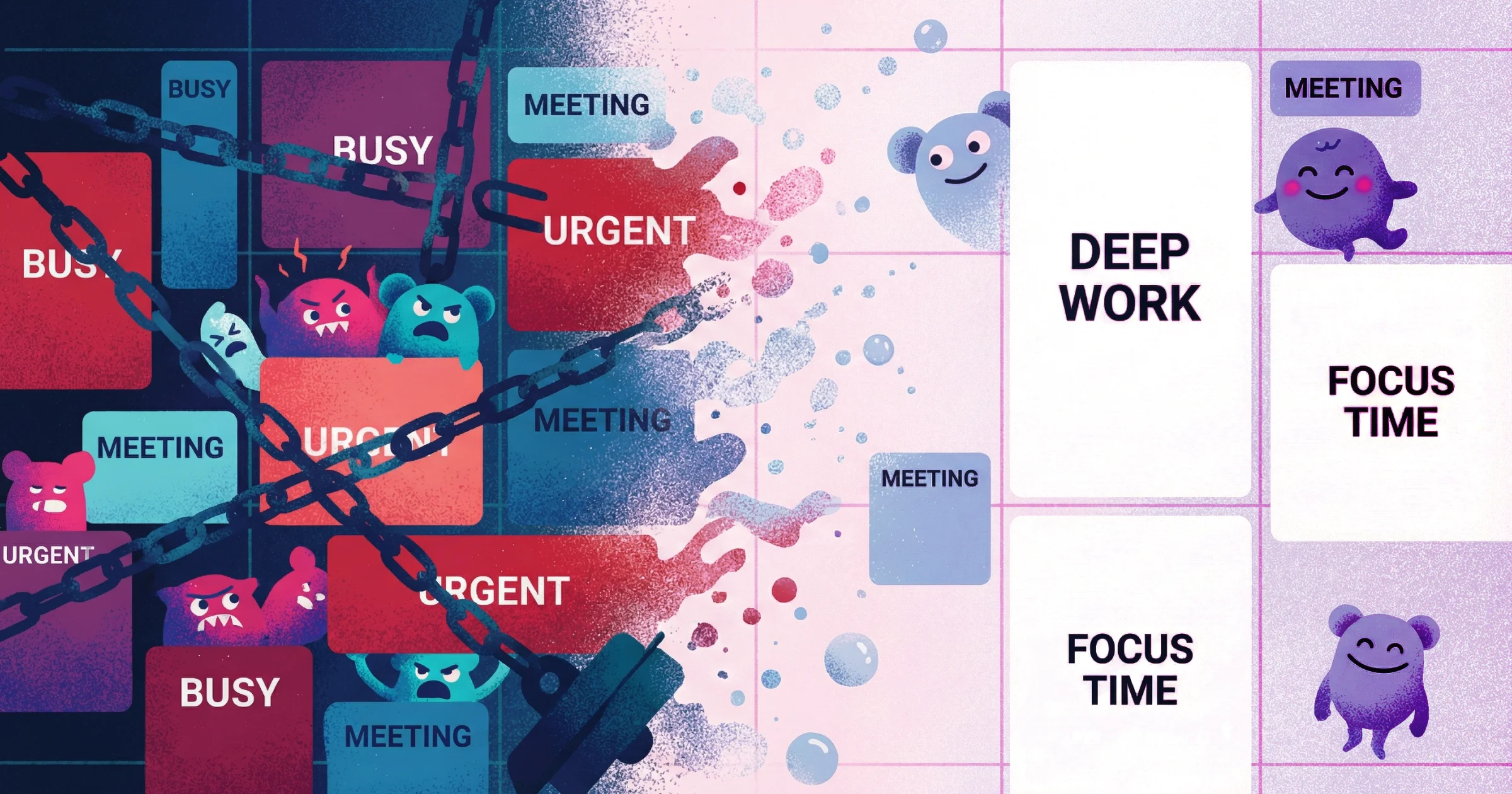
Most meetings exist because someone needed to explain something visual, get quick alignment, or collect feedback. But here's the problem: synchronous calls are expensive. They require everyone to be available at the same time, they expand to fill their time slots, and they rarely produce documentation anyone can reference later.
After 15 years working both in-house creative teams and with external agency partners, I can tell you firsthand—too many meetings at work don't just eat your calendar. They destroy the focused time you need to actually do the work worth meeting about.
The solution isn't eliminating communication. It's replacing the medium with something that doesn't require calendar coordination.
Why Most "Reduce Meetings" Advice Fails
The standard advice—decline more meetings, make them shorter, require agendas—treats symptoms instead of causes. You end up in a constant negotiation about which meetings are "necessary" while the underlying communication needs remain unaddressed.
Meetings persist because they solve real problems:
Showing someone what you mean is faster than typing it
Real-time conversation feels more reliable for alignment
It's easier to schedule a call than write a detailed document
The fix isn't willpower. It's finding alternatives that solve these problems better than meetings do.
The Hidden Cost of "Quick Calls"
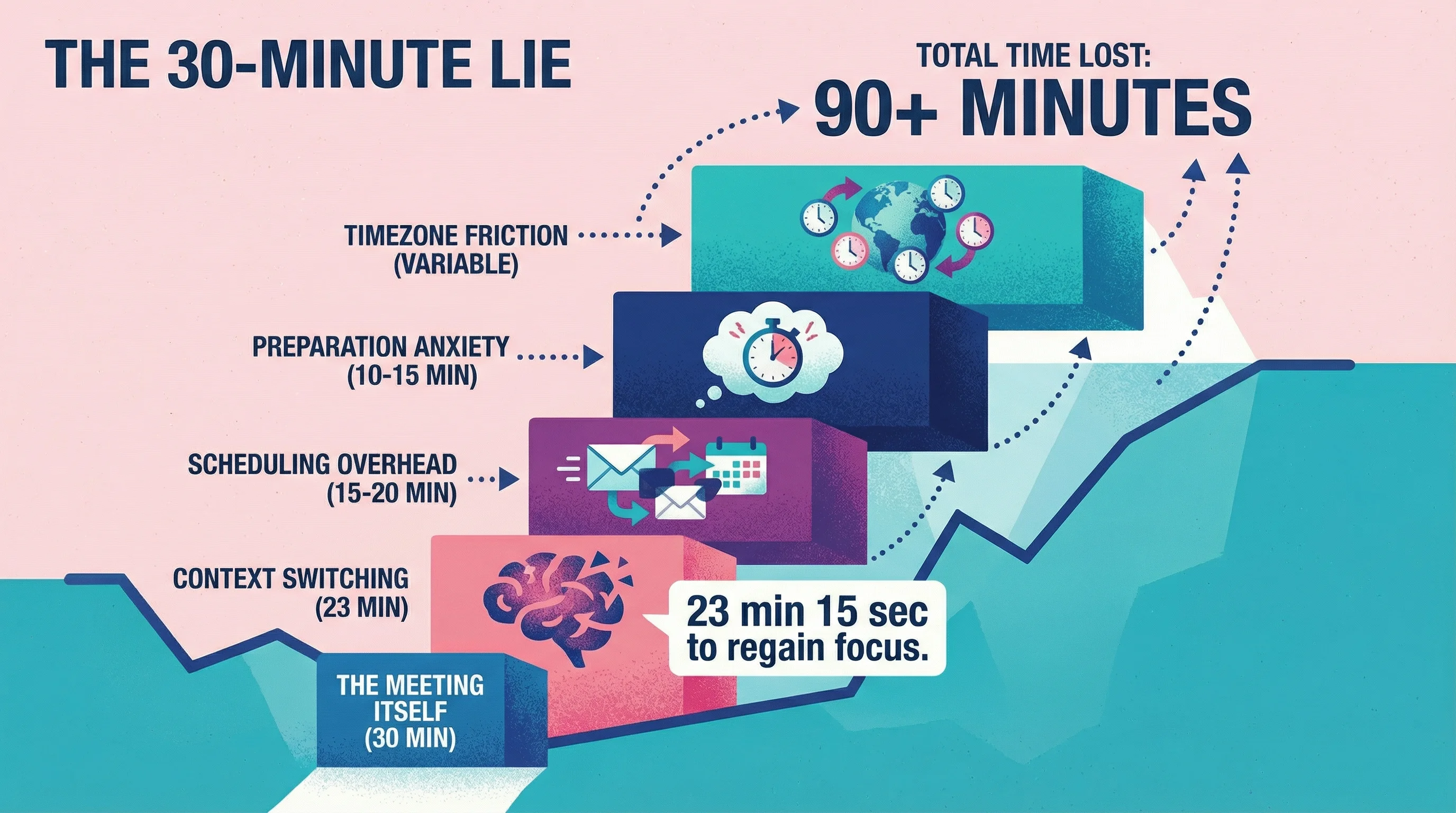
A 30-minute meeting rarely costs 30 minutes. Factor in:
Context switching: According to research from UC Irvine, it takes an average of 23 minutes and 15 seconds to fully regain focus after an interruption. That "quick 15-minute sync" often burns nearly an hour when you account for the full cognitive cost.
Scheduling overhead: A 2024 Calendly study found that 43% of workers spend over 3 hours per week just scheduling and organizing meetings—time that produces zero actual work.
Preparation anxiety: The mental load of having something on your calendar. Every meeting scheduled is mental bandwidth reserved.
Timezone friction: For distributed teams, someone's always compromising. I've worked with teams across Bali, New York, and London—finding a time that worked meant someone was always taking a call at midnight or 6 AM.
I know these costs aren't theoretical because I religiously track my time. Every work session, every block of creative thinking, every hour spent developing websites versus designing them—it all goes into my tracking system. And I separately track everything I label "admin": meetings, clarification calls, writing emails, waiting for responses.
After tracking for a full year as an independent designer handling 15-20 projects, here's what I found: I was losing roughly 300 hours annually just to client video calls—check-ins, alignment meetings, "quick syncs" that ballooned into hour-long conversations. That's nearly 8 full work weeks spent talking about work instead of doing it.
The numbers are staggering at scale too. Research from Fellow shows unproductive meetings cost U.S. businesses an estimated $37 billion annually in lost productivity. Other estimates put that figure as high as $259 billion when you factor in the full cost of context switching and reduced output quality.
What Is Async Communication? And Why It Works
Async communication (short for asynchronous) means exchanging information without requiring everyone to be present at the same time. Think: recorded video messages instead of live calls. Written updates instead of status meetings.
What is async communication in practice? It's sending a 3-minute Loom walking through your feedback instead of scheduling a 30-minute call. It's posting a weekly video update your team watches on their own time instead of pulling everyone into a Monday standup.
The key insight: async video communication lets you show what you mean (the main benefit of meetings) without the coordination cost.
Too Many Meetings? Here's How to Audit Your Calendar
Look at your last two weeks of meetings. For each one, ask:
Did this require real-time interaction, or was it just information transfer?
Could I have communicated the same thing in a 5-minute video?
Did we make decisions, or just share updates?
When I did this audit on my own practice, I found that 60-70% of client calls existed for one reason: the client needed to show me what they meant. "The logo feels off" became a 45-minute call because they couldn't articulate it in writing—but could point to it on screen in 30 seconds.
This is the core problem with written design feedback—it often creates more confusion than clarity.
The moment I started replacing those calls with alternatives that let clients communicate their needs visually on their own time, everything changed. I was getting more done in a day. Not because I was working more hours, but because those calls weren't breaking up my time, weren't breaking up my focus, and weren't interrupting my creative flow.
This realization is what ultimately led me to build Talki. I needed a way for clients to show me exactly what they meant without requiring us to find a time slot that worked for both of us.
Most people find 40-60% of their meetings could have been async. The question is: which ones?
The Async-First Framework: Which Meetings to Replace
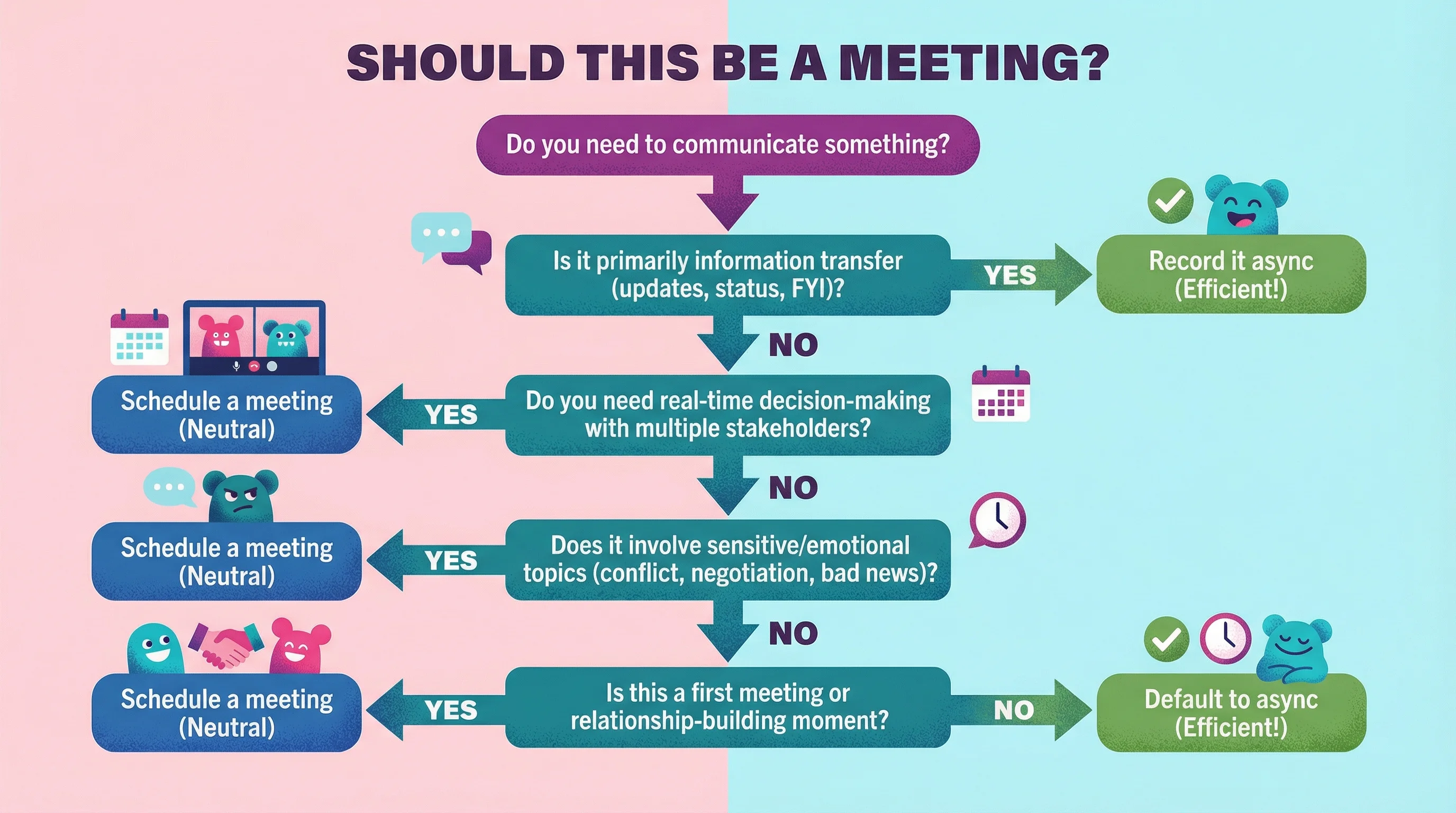
Not every meeting should become an email. But most meetings fall into categories that async video handles better than synchronous calls.
Meetings You Can Replace Today
Status updates and check-ins If the primary purpose is sharing information rather than making decisions, record it instead. Team members watch on their own time, at 1.5x speed if they want, and you have a searchable record.
According to Microsoft's Work Trend Index, communication activities (meetings, chat, email) consume 57% of work time—leaving only 43% for focused work. Async updates help reclaim that balance.
Feedback and review sessions Walking through a design, document, or deliverable is often easier to show than describe. A 3-minute screen recording where you point at specific elements replaces a 30-minute call where you're both squinting at a screen share.
This was the lightbulb moment for me. I spent years on "quick calls" where clients pointed at their screen saying "this part here doesn't feel right." That visual context was essential—but the synchronous timing wasn't.
Related: How to Get Client Feedback That Shows You Exactly What They Mean
Onboarding and training Record explanations once, reuse them forever. New team members can pause, rewind, and reference later instead of asking you to repeat yourself. One agency owner I spoke with said their onboarding time dropped by 40% after moving to recorded walkthroughs.
Client updates and presentations Send a recorded walkthrough clients can watch when convenient. They can share it with stakeholders who weren't available for a live call, and you've created documentation of what was communicated.
Meetings Worth Keeping (Solutions for Too Many Meetings Don't Mean Zero Meetings)
When async communication creates confusion Sometimes you've tried the back-and-forth—you've sent videos, they've sent videos—and you're still not aligned. This is where synchronous meetings become essential. When a client is genuinely confused after attempting to communicate asynchronously, that's when your problem-solving skills need to show up in real-time. This kind of collaborative troubleshooting can't be replaced by trading recordings.
Initial client onboarding I keep every first client meeting synchronous, no exceptions. This initial touchpoint sets the tone for our entire working relationship. It's where I establish trust, read their communication style, and make a strong first impression. Trying to async your way through a first meeting feels transactional—and relationships aren't built on transactions.
Complex negotiations or difficult conversations When emotions are involved or you need to read the room, synchronous communication still wins. Discussing scope changes, addressing missed expectations, or renegotiating timelines—these deserve face time where you can respond to tone and body language in real-time.
Brainstorming sessions that build on energy Some creative work benefits from real-time riffing. Don't force async on processes that genuinely need spontaneity.
How to Actually Make the Switch: Reducing Unnecessary Meetings
Knowing which meetings to replace is the easy part. Getting your team and clients to adopt async communication requires a system.
Step 1: Create Recording Habits
The friction of recording a video feels higher than scheduling a call—until you build the habit. Start with:
Feedback and revisions: Instead of hopping on a call to explain changes, record a quick walkthrough showing exactly what you mean.
See also: Video Feedback Tools Compared: Which Design Feedback Tools Actually Get Used
Weekly updates: Replace standing meetings with a recorded summary team members watch independently. A Fellow research study found that 92.4% of recurring meetings don't have an end date—they just persist forever, eating calendar space.
Client deliverables: Send a recorded walkthrough with every major deliverable.
Step 2: Use the Right Tools
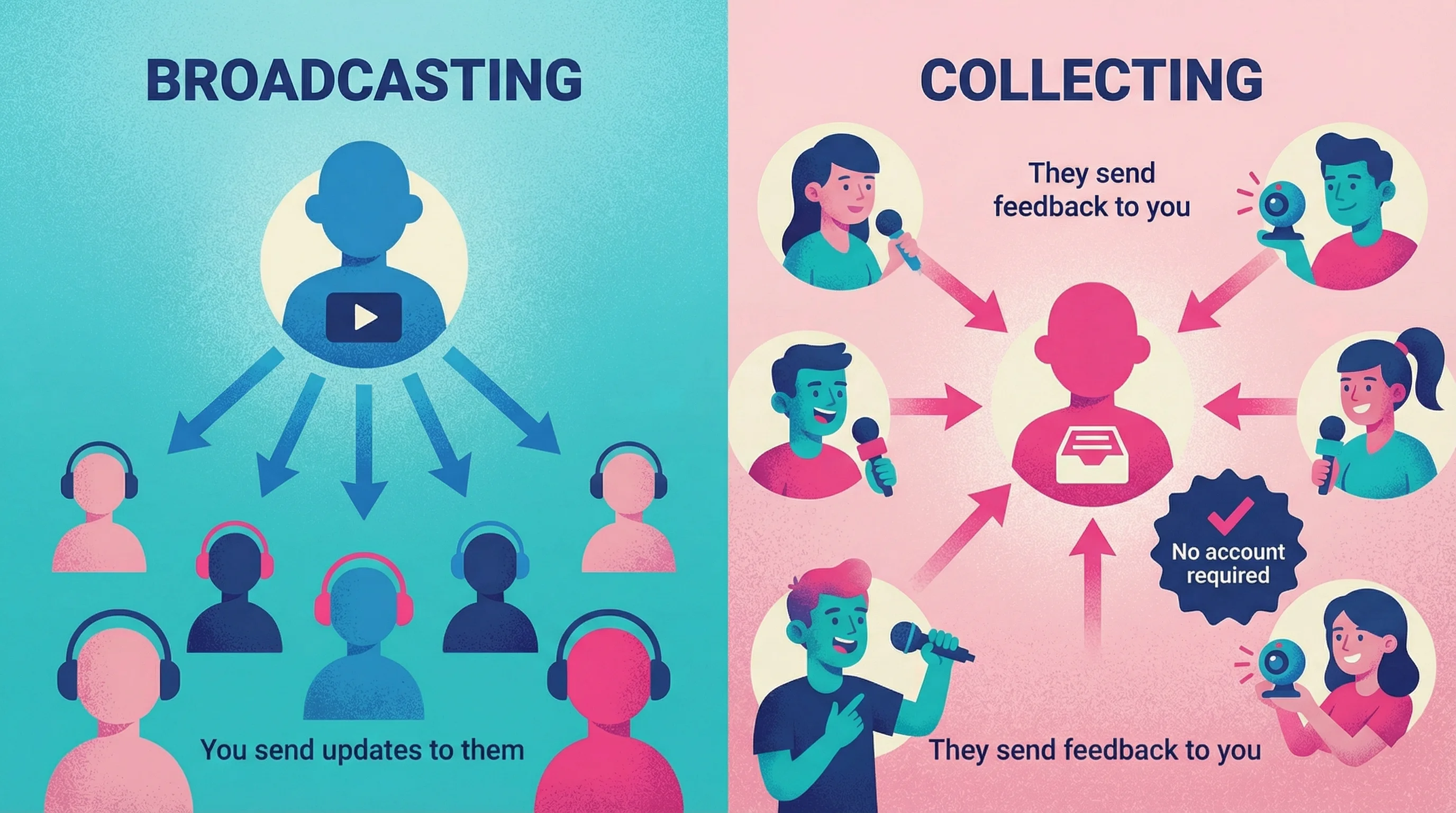
Tools like Loom and its alternatives work for broadcasting information—sharing updates, explaining decisions, walking through deliverables.
But here's what I learned running and operating an independent creative practice: the harder problem isn't sending videos. It's collecting them. When you need clients or collaborators to record responses back to you, every friction point kills adoption.
The typical experience: Client opens link → needs to create account → needs to download app → gives up → sends vague email instead.
This is exactly why I built Talki. It removes the friction by letting recipients record without accounts or software downloads. The "reverse Loom" concept—you're collecting feedback, not broadcasting it.
Related: Feedback Collection Tools Compared: Forms vs. Video vs. Async
Step 3: Set Response Expectations
Async doesn't mean slow. Establish norms:
Recordings under 5 minutes get responses within 24 hours
Urgent items get flagged in Slack/email with the video link
Weekly async updates replace Monday standups entirely
A 2024 Asana study found that time wasted in unproductive meetings has doubled since 2019 to 5 hours per week. Setting clear async expectations prevents that creep.
Step 4: Protect the Time You've Saved
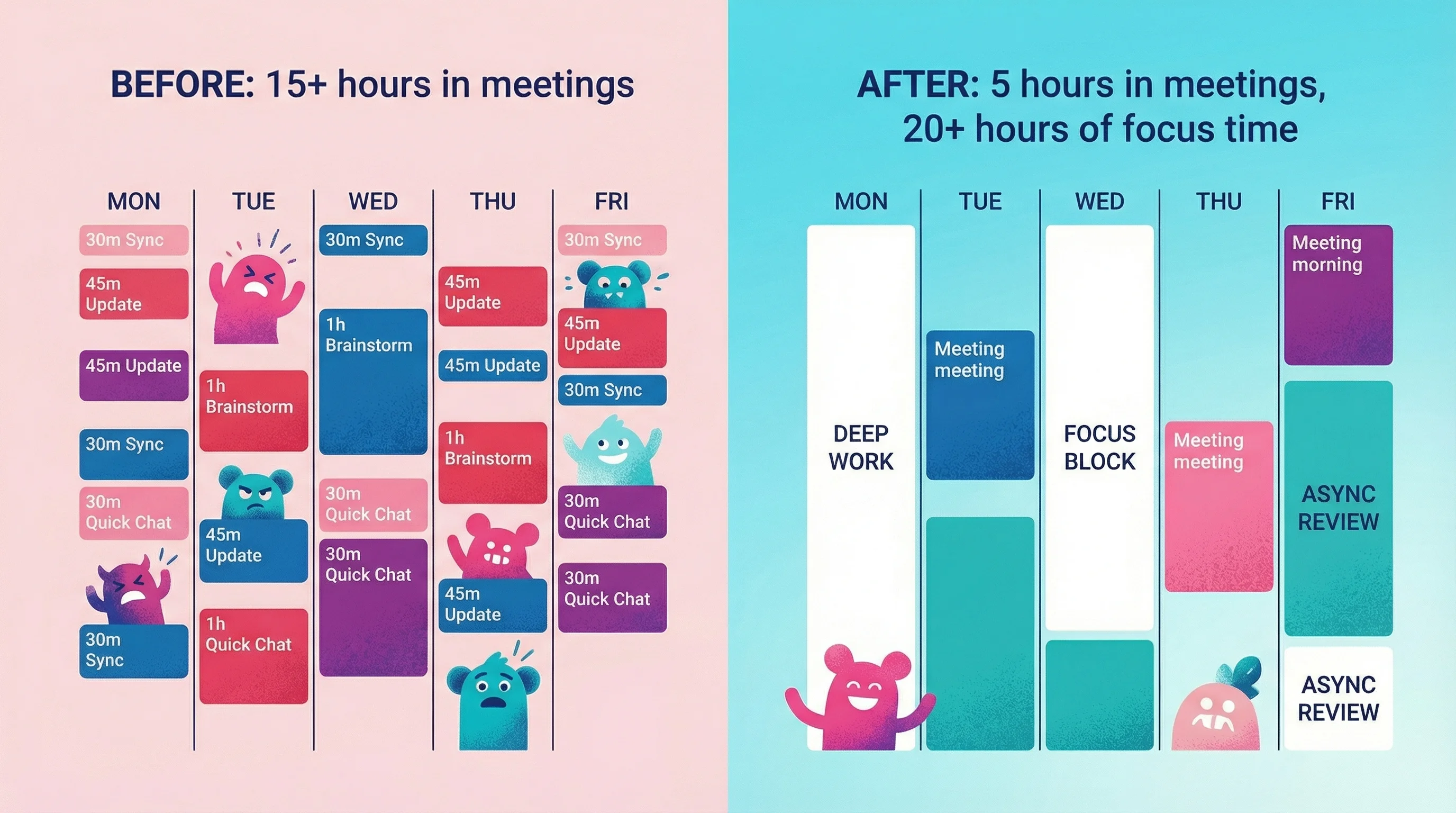
The goal isn't an empty calendar—it's uninterrupted blocks for deep work. When you cut meetings, immediately block that time for focused work or it'll fill with new meetings.
According to research from The Atlantic, the most productive workers work for 52 minutes straight, followed by a 17-minute break. That's impossible if your calendar is a patchwork of calls.
How to Reduce Meetings in the Workplace: Scripts That Actually Work
The hardest part of reducing meetings is saying no without damaging relationships. Here are scripts that work:
For internal requests: "I want to make sure I give this proper attention. Could you send me a quick video walking through what you're thinking? I'll respond with my thoughts by [specific time]."
For client requests: "I'd love to see exactly what you're envisioning. Would you mind recording a quick screen share showing me? That way I can review it carefully and come back with specific solutions."
For recurring meetings: "I've been thinking about how we can make this time more valuable. What if we tried async updates for two weeks and kept the meeting slot for issues that need real discussion?"
These are cleaned-up versions of actual emails I've sent to clients. The core message that works every time: frame async as something that benefits them, not just you.
When you communicate that they can share their screen and record feedback on their own time, you're not just saving yourself from interrupted focus blocks—you're giving them permission to stop rearranging their schedule around your availability. Most clients are juggling their own overloaded calendars. When they realize async means they can send you detailed feedback at 10pm without waiting three days for a mutual opening, the value becomes obvious.
This shift helps clients see tools like Talki not as an inconvenience, but as a way to communicate their ideas, thoughts, and feedback more completely—without the pressure of articulating everything perfectly in a live call.
Most people are relieved to skip a meeting. They just need permission and an alternative.
Measuring Success: How Many Meetings Are Too Many?
Track these metrics for 30 days:
Metric | Before | After | Goal |
|---|---|---|---|
Hours in meetings/week | — | — | 50% reduction |
Avg. meeting length | — | — | Shorter when sync is needed |
Response time on feedback | — | — | Faster than scheduling allowed |
Deep work blocks/week | — | — | 2-3x increase |
The real measure: Are you getting more done with less calendar stress?
Research from Atlassian suggests lost productivity due to context switching costs the global economy an estimated $450 billion annually. Even a 20% reduction in unnecessary meetings translates to meaningful gains.
FAQ
How do I reduce meetings without seeming uncooperative?
Frame async as better communication, not avoidance. "I want to give this proper attention—let me record a detailed response" signals more care than squeezing in a rushed call.
What's the best tool for async video communication?
For sending updates, Loom is the standard. For collecting feedback where you need others to record responses to you, look for tools that don't require recipients to create accounts—that friction kills response rates.
For a detailed comparison of your options, see Feedback Collection Tools Compared: Forms vs. Video vs. Async.
How long should async video messages be?
Under 5 minutes for most updates. If you're going longer, consider whether it should be a document or a meeting after all. Research shows that 52% of meeting attendees lose interest after 30 minutes, and 96% lose focus by 50 minutes—the same principle applies to video.
Will clients accept async communication?
Most clients prefer it once they try it. They can watch on their schedule, share with stakeholders, and reference recordings later. Start by sending async updates in addition to calls, then transition as they see the value.
Here's what I've found in practice: I have a mix of clients—some who still prefer frequent video calls, and others who've fully embraced async communication. The clients I work with on a more asynchronous basis? They're consistently the ones I enjoy working with most, and the feeling is mutual. We have genuinely pleasant working relationships.
These tend to be companies that are more progressive and forward-thinking. They value their time as much as I value mine. Working with them has given me confidence to keep bringing new clients into this way of operating. Not every client will embrace it immediately, but the ones who do become your best, most sustainable relationships.
What if my company culture expects constant meetings?
Start small. Replace one recurring meeting with an async update and track results. When you can show concrete metrics—faster feedback cycles, more deep work time—the case makes itself.
Start This Week
Pick three meetings from your calendar that could be async. Replace them with recorded updates and see what happens. The goal isn't to eliminate human connection—it's to reserve synchronous time for conversations that actually need it.
The irony of most meeting culture: we're so busy talking that we don't have time to do the work worth talking about.